ChatGPT Atlas: What OpenAI Doesn’t Want You to Know?
OpenAI's ChatGPT Atlas security review reveals critical 2025 privacy risks and data protection flaws. Learn if this AI browser is safe for your data.
Read MoreLatest News, Trends, Tech Updates, and Political Insights.

SEATTLE, USA — October 20, was one of those days where the internet just… stopped. Amazon’s cloud services went down, and suddenly apps like Roblox, Signal, Slack, Reddit, Canva, Airtable, ChatGPT, and the Epic Games Store were all offline. Millions of people felt the chaos instantly—it wasn’t just a tiny glitch. Moments like this really show how much we rely on a few giant companies to keep our online world alive.
Think about it—back in the day, the internet was this wild, spread-out thing where anyone could jump in. Now? It's like everything flows through giants like Amazon, Google, or Microsoft. When one of them stumbles, we all feel it. This outage is a perfect example, and it's got everyone talking about how to make our digital world more stable. For more on staying safe with AI tools like ChatGPT during disruptions, check out our guide on the ChatGPT Atlas browser. It's full of simple ways to keep your conversations going even when the main service has problems.
We've all been there, right? That moment when your favorite app just stops working. It feels personal, like the tech world is playing a prank on you. But here's the good news: These glitches teach us a lot, and with a few easy changes, you can avoid the panic next time. Stick with me, and I'll walk you through everything in simple terms—no fancy jargon, just straightforward advice that actually helps.
"Outages like this are bound to happen with systems this massive and complex, but they don't have to knock everything offline if we have proper backups in place," said an AWS representative, talking about the need for better planning.
The whole mess started around midnight Pacific Time on October 19—that's about 3 a.m. Eastern on the 20th. AWS's status page lit up with alerts about problems in the US-EAST-1 region, which is in Northern Virginia. At first, it seemed like a minor network issue, but it quickly snowballed into something much bigger. You can check current status here on AWS's official dashboard—it's a simple page that shows if things are working or not.
By the time people were waking up and grabbing their morning coffee, error messages were popping up everywhere. The main problem? DynamoDB, AWS's popular database service, couldn't be reached because of DNS issues. This meant EC2 servers—basically the virtual computers that power many apps—couldn't start up properly, and load balancers started failing too. More than 15,000 people reported problems, and companies were scrambling to figure out what was going on.
The chaos lasted for more than 14 hours in some places, with things not fully back to normal until the afternoon. One developer posted online, "One minute everything was working fine, the next our entire app was down. We had to switch to manual backups on the fly." Videos of frustrated users and frozen screens flooded social media, with #AWSOutage becoming a trending topic as everyone shared their experiences. I remember seeing one video of a kid in the middle of a Fortnite match, yelling at the screen—it was both funny and frustrating to watch.
And it wasn't just tech experts feeling the pain. Regular people trying to check their bank accounts or stream a show were locked out too. These moments make you realize how much we've come to depend on the cloud without even noticing—it's everywhere, supporting our daily routines until it breaks. Next time you're scrolling through social media, think about how one server room in Virginia keeps all your content loading.
Let's break this down in simple terms. The trouble started with a timing issue in DynamoDB's system for handling web addresses—think of DNS as the internet's phonebook. Two automated systems that update these addresses got out of sync. One was running behind, and the other, thinking it was cleaning up old entries, accidentally deleted all the IP addresses for DynamoDB in that region.
Just like that—no way to find the database. Since so many AWS services depend on DynamoDB, the problems spread like wildfire. Servers couldn't renew their connections, leading to a situation where everything tried to fix itself at once, making things even worse. Load balancers, which direct traffic like police officers directing cars, failed their checks and took perfectly good servers offline. This was the third major problem in US-EAST-1 over five years, and experts say it's because that region is handling way more traffic than it was originally designed for. For a detailed explanation, AWS's post-incident summary clearly explains that an empty DNS record was the core issue. It's like they left the key under the doormat, and then the doormat disappeared.
According to AWS, it was a "race condition"—technical jargon for two things happening at the wrong time and conflicting with each other. They fixed it by manually restoring the addresses and adjusting the automated systems to prevent it from happening again. But during the outage, it felt like watching a domino effect in slow motion. Recent analysis from ThousandEyes shows how this problem cascaded across global networks, turning a local issue into a worldwide headache. If you've ever waited for your coffee maker to restart during a busy morning, multiply that frustration by a million—that's what it felt like.
This wasn't just a minor server problem; it brought everyday activities to a halt. Snapchat users couldn't send messages back and forth, Fortnite gamers were kicked out of matches in the middle of battles, and Reddit conversations went silent. If you were using Slack to communicate with your team or Airtable to manage spreadsheets, you were out of luck—productivity took a nosedive. Even financial apps like Coinbase and Robinhood had issues, and in the UK, some government websites went dark too.
More than 1,000 companies reported problems, with small businesses losing sales and big names like Netflix dealing with slow streaming. Experts estimated the total cost in the billions—yes, with a B. One report counted over 17 million complaints worldwide, showing how a regional problem can have global effects. Imagine running a delivery business and your tracking app stops working; customers aren't happy, and you're losing money. Reuters covered the immediate impact in real-time, painting a picture of chaos from coast to coast.
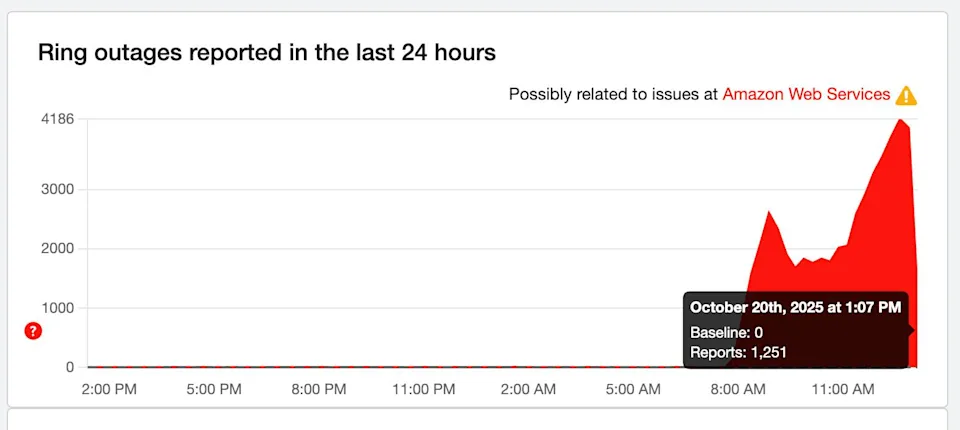
For regular users, it meant no quick Google chats or AI brainstorming sessions—tools like ChatGPT were offline, forcing many to pause their creative work. Businesses were constantly refreshing dashboards, hoping for green lights. This really showed how one company's technical issue can disrupt the entire online world. And let's be honest, in a world where we rely on these apps for work, entertainment, and even quick answers, that downtime hits harder than a bad Wi-Fi day at home.
AWS has been through this before, and it's starting to become a pattern. Go back to 2022: Another US-EAST-1 problem knocked services offline for hours. Then 2021—oh boy, that one was a mess, taking down airlines, streaming services, and more because DynamoDB had issues again. Don't forget 2020's power outage or 2017's software glitch that left everyone hanging.
Each time, the story is the same: Too much depending on one busy region means when it has problems, everything else suffers. AWS has implemented fixes, but these recurring issues make you wonder if they're struggling to keep up with their own growth. It's like building a skyscraper floor by floor without checking the foundation regularly. We've seen similar patterns with other tech giants too—remember when Facebook went dark for a day? Same kind of problem, just with a different company.
Looking at the pattern, it's clear that US-EAST-1 is the weak link—it's the oldest and busiest region, handling about a third of AWS's traffic. Spreading services across more regions could help, but hindsight is always 20/20. The main lesson? Don't put all your eggs in one basket, especially if that basket is in Virginia during rush hour.
Let's talk about the financial impact. Experts estimate that this outage cost billions in total, with lost sales, delayed work, and emergency fixes adding up quickly. Small online businesses might have missed a full day of orders, while giants like Amazon's own e-commerce platform saw shopping carts abandoned left and right.
Beyond the direct financial losses, there were other effects: Stock trading was paused, hospitals had to reroute patient information manually, and some flights were grounded because booking systems went down. One study recorded more than 17 million complaints, showing the scale of frustration. For global teams, time zones made things worse—European mornings overlapped with US nighttime fixes, extending the pain. Ookla's report breaks down the global effects in detail, showing how speed drops affected users from Los Angeles to London.
In the long term, this might push companies to reconsider their budgets for backup systems, but right now, it's a stark reminder that "cloud nine" can quickly turn into "cloud zero," hitting bottom lines hard. If you're a small business owner, this is your cue to talk with your IT person about a Plan B—trust me, it'll save you headaches and money down the road.
Tech experts aren't holding back. One network specialist at CU Boulder called it a "perfect storm" of overload in a key hub, emphasizing how one problem can ripple outward like a stone thrown in a pond. Another expert from UNH pointed out that major outages like this highlight our over-reliance on the "big three" cloud providers—AWS, Azure, Google—making everyday life unstable when they have issues.
"This won't send everyone running to competitors, but it will push for more diversification," says a cloud analyst, predicting a gradual shift toward multi-cloud setups. Tech journalists note that with systems this massive, glitches are somewhat expected, but smarter designs could reduce the drama. Overall, the consensus? It's time to stop treating the cloud as a magic solution and start building in some flexibility. As an alternative, Microsoft's Copilot 2023 updates are enhancing Azure's reliability features, making it easier to switch without starting from scratch.
What I appreciate about these expert discussions is how practical they remain. No blame game, just "let's learn from this and improve." It's that kind of straightforward advice that makes you feel like you have a team of experts on your side.
AWS didn't waste time—they jumped into action immediately. By early morning on October 20, they identified the DNS problem and started manually fixing records while adjusting the automated systems to prevent further issues. DynamoDB stabilized around 2:24 a.m. PDT, but the aftereffects—like backed-up messages—lingered until 3:53 p.m.
Everything was back to normal around 6 p.m. ET, with their dashboard showing "all clear." They rerouted traffic intelligently and restarted services in waves to avoid more pile-ups. In their summary, AWS took responsibility: "We're committed to learning from this and strengthening our systems." They've since disabled the problematic feature globally and added additional checks for data deletions. The Guardian's coverage of the announcement adds more context about the bug, including quotes from insiders who worked through the night to fix it.
It was a tough process, but their quick response prevented the problem from dragging on for days. Still, users were left wondering why these issues keep happening. Credit to AWS for being transparent—it's more than some companies offer, and it builds trust when you're in the middle of fixing a major problem.
If you're running a business or team online, don't wait for the next problem to happen. Start with monitoring tools like AWS CloudWatch or Datadog—they alert you immediately when something seems wrong, so you can switch to Plan B right away. It's like having a smoke alarm for your website; simple peace of mind.
Diversify your setup: Place your applications in multiple regions, not just the busy US-EAST-1. That way, if one region has problems, others can handle the load. Set up automatic switches to backup servers, and use CDNs like Cloudflare to store content closer to your users—eliminating single points of failure. I've talked to small business owners who swear by this approach; one told me it saved his Black Friday sales last year.
And don't forget to practice! Test your "what if" plans quarterly, so your team knows what to do without panicking. Local backups of important files mean you can keep working even when online services are down. It's not rocket science—just smart insurance against digital problems. Start small, maybe with a free trial of a monitoring tool, and build from there.
Okay, let's get practical. If you're in the middle of an outage and everything is frozen, here's a simple guide to get back online quickly. No technical degree required—just follow these steps one by one.
Follow these steps, and you'll feel much more in control. I wish someone had given me this list years ago—it would have saved me from countless frantic Google searches.
You don't need to be a tech expert to avoid these problems. Choose apps that work without internet and sync later—like desktop programs for editing documents. Mix up your storage options; use some independent services with strong privacy that aren't connected to the big companies.
Always keep copies of important files on your computer or an external hard drive. And talk with friends about alternatives—if Slack is down, switch to email or text messages. Small steps like these keep you in the game when the cloud has problems. Oh, and download your key files weekly; it's a habit that pays off big when you least expect it.
AI users felt this outage particularly hard. Tools like ChatGPT and Perplexity rely on AWS behind the scenes, so when the outage hit, brainstorming sessions stopped mid-conversation. Writers couldn't generate ideas, programmers lost their debugging assistants, and students had to pause on homework helpers. It was a reminder that even the "smart" tools we love are built on the same fragile foundation.
But don't worry—there are easy workarounds. Offline AI apps like local versions of ChatGPT can keep you going, or you can switch to browser extensions that save responses. For more security, our article on the ChatGPT Atlas browser explains secure browsing that avoids these disruptions. Imagine finishing that report without staring at a loading screen—pure relief.
Looking ahead, AI companies are considering more distributed setups, so these blackouts might become less common. In the meantime, build a small toolkit: A notebook for ideas when screens fail, and a list of free alternatives. It's about staying creative, no matter what the servers are doing.
AWS isn't stopping at quick fixes—they're planning bigger changes. Think more automated safeguards against those timing conflicts and better load balancing across regions. They're also asking customers for feedback, aiming to cut outage times in half in the future. Their latest post-incident report, released October 25, outlines plans for improved DNS validation and regional failover testing—basically, smarter checks to catch problems before they cause trouble.
Across the industry, there's growing interest in hybrid clouds—mixing private systems with public ones for extra reliability. Regulations might also step in, pushing for clearer outage reporting. Things are evolving, but it will take time to overcome these growing pains. On the bright side, every issue like this pushes the entire field forward, making our online lives smoother in the long run.
What excites me most? The focus on user feedback. AWS is listening, which means fewer surprises for all of us. Keep an eye on their updates—they're worth reading for anyone who uses digital services.
The internet started as a decentralized, resilient network. Now it's concentrated in the hands of a few companies, which is convenient but risky. To fix this, we need to diversify—more independent providers, open-source tools, and user-controlled data.
Advocate for rules that keep things fair and diverse, like Europe's Eurostack initiative for homegrown cloud services. It's about choices: Select tools that distribute the load, protect your information, and don't let one problem disrupt your entire day. That's the real way to keep the internet working for everyone. Imagine a web where one glitch doesn't silence the world—that's the goal, and we're getting closer.
At the end of the day, it's up to us too. Talk with your network, share these tips, and support reliable services with your clicks. Together, we can build something unbreakable.
When the internet goes down, it affects real people in real ways. We collected some stories from folks who lived through the October 2023 AWS outage:
"I run an online bakery, and when our ordering system went down during our busiest time, I thought we'd lose thousands in sales. Luckily, I had a simple paper backup system ready. We took orders by phone and manually entered them later. It was old-school, but it saved the day!"
"I was in the middle of a huge group project on Google Docs when everything froze. We panicked at first, but then we remembered we could work offline. We finished our parts and synced up when the connection came back. Our teacher was impressed we had a backup plan!"
"My whole job depends on cloud services. When Slack went down, I thought I'd be disconnected from my team. But we switched to text messages and got through the day. It reminded me that having multiple ways to communicate is crucial, even in 2023."
Ready for the next internet hiccup? Use this simple checklist to make sure you're prepared:
Small businesses often feel the impact of outages most acutely. Here's a practical guide to help your business weather the next storm:
Don't rely on a single platform for everything. If you sell products online, consider having your own website in addition to marketplace listings. This way, if one goes down, you can still operate through the other.
When online payment processors go down, sales stop. Have a backup ready – even something as simple as being able to take orders over the phone with manual payment processing later can save the day.
During an outage, customers get frustrated. Be proactive by using social media, email, or text messaging to keep them informed. A simple "We're experiencing technical difficulties but are working on it" message goes a long way.
If you have business interruption insurance, proper documentation is key to making a claim. Keep screenshots of error messages, note the exact times services went down and came back up, and track any financial impact.
Customers who feel connected to your business are more likely to be patient during technical difficulties. Foster this connection through excellent service, personalized communication, and maybe even a loyalty program.




 Skasif