18 JSON Prompts That Turn ChatGPT & Gemini Into Professional Photo Editors
Unlock the hidden "Director Mode". Here are the absolute best AI photo editing prompts, featuring identity locks, cinematic couple selfies, and hyper-realistic scene generation.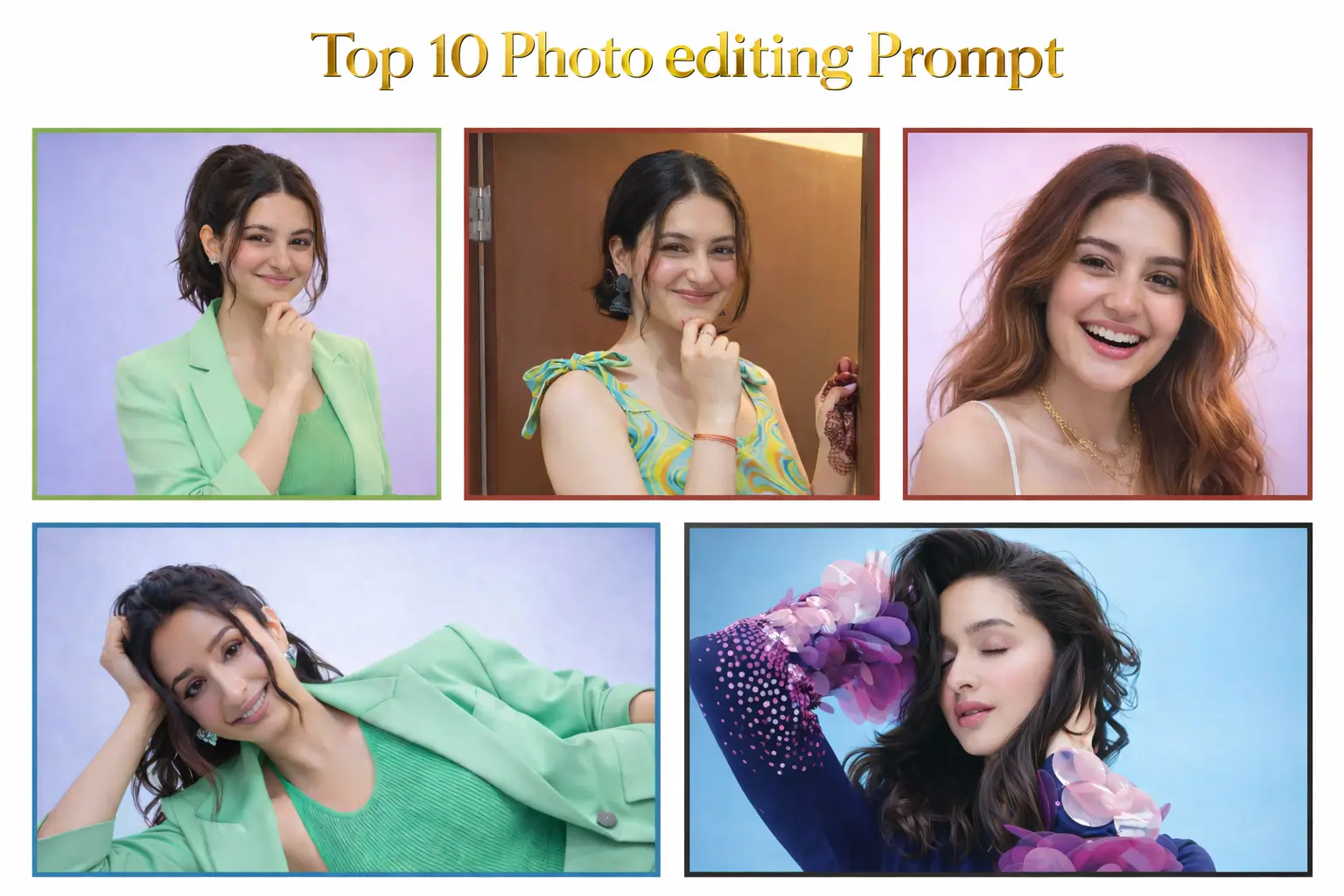
Imagine having a professional photographer, a high-end retoucher, and a creative director tucked inside your pocket, ready to work 24/7. That is exactly what modern generative AI has become. But when it comes to AI photo editing prompts, most users barely scratch the surface by typing simple, vague commands like "make me look cool." Today, we change that narrative entirely.
Welcome back to NewsIQ. If you've been wondering how to use JSON prompts in Google Gemini for identity lock, or searching for the ultimate face preserving AI editing prompts inside ChatGPT Plus, you're in the right place. We are handing you the exact JSON code—the "secret language"—that forces AI models to stop guessing and start following strict architectural orders. These 18 JSON prompts for ChatGPT photo editing 2026 (plus brand new viral lockscreen and wedding additions) strip away the randomness. They give you surgical precision over poses, outfits, lighting, and most importantly, facial consistency.
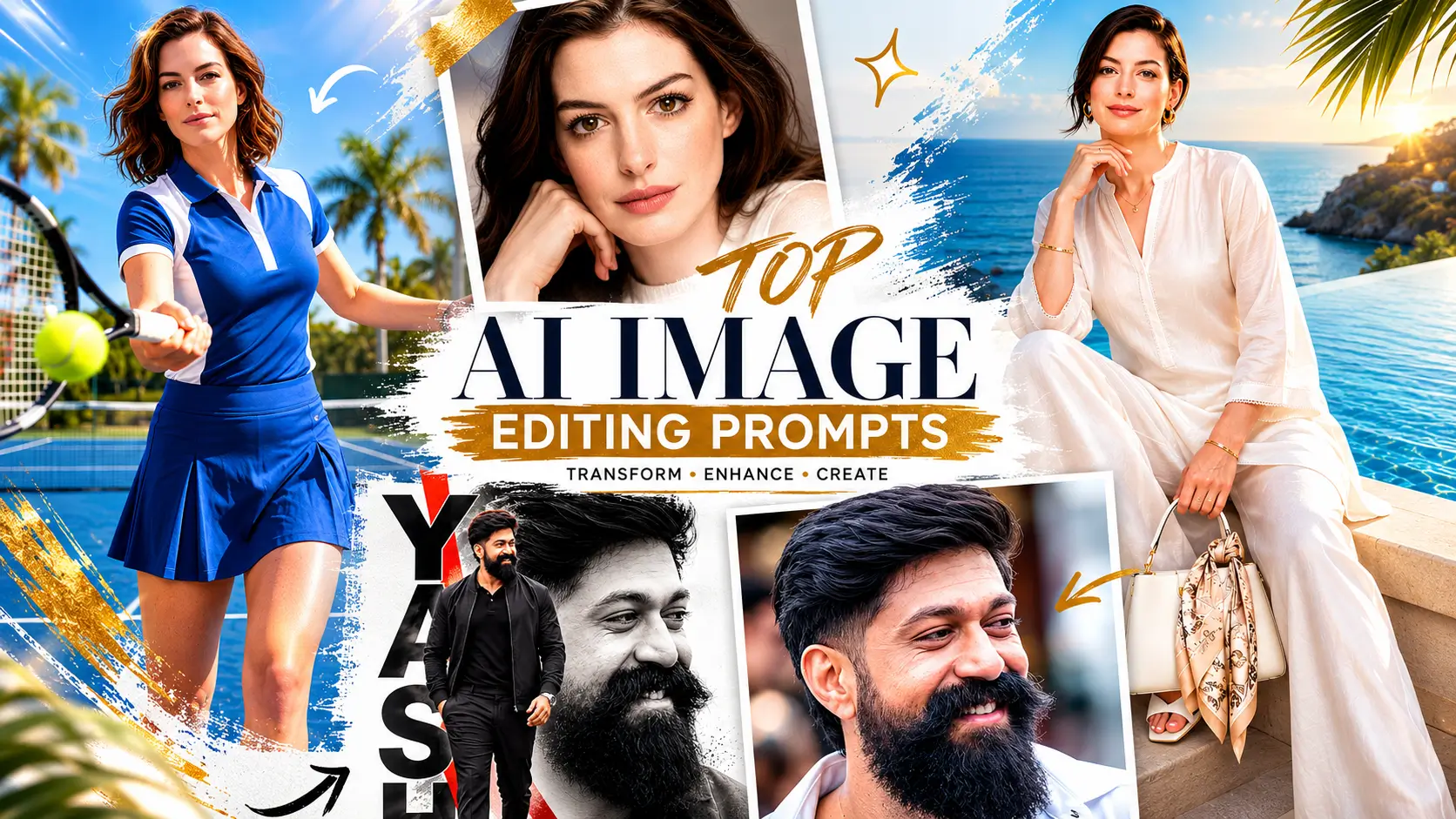
Best ChatGPT Photo Editing Prompts (2026 Edition)
Unlock the newest system instruction secrets to transform, patch, and restyle your portraits using ChatGPT's elite rendering configurations.
To get true professional AI photo editor prompts to work flawlessly, we highly recommend trying these out on the powerful ChatGPT 1.5 image prompts engine or exploring our detailed guide on Nano Banana Pro prompts for a Midjourney alternative experience.
1. Dreamy Indian Wedding Portrait NEW
Visualize the perfect wedding day with this highly detailed prompt. It generates a luxurious, hyper-realistic bridal portrait under a pastel floral mandap, complete with intricate embroidery details and authentic cultural attire.
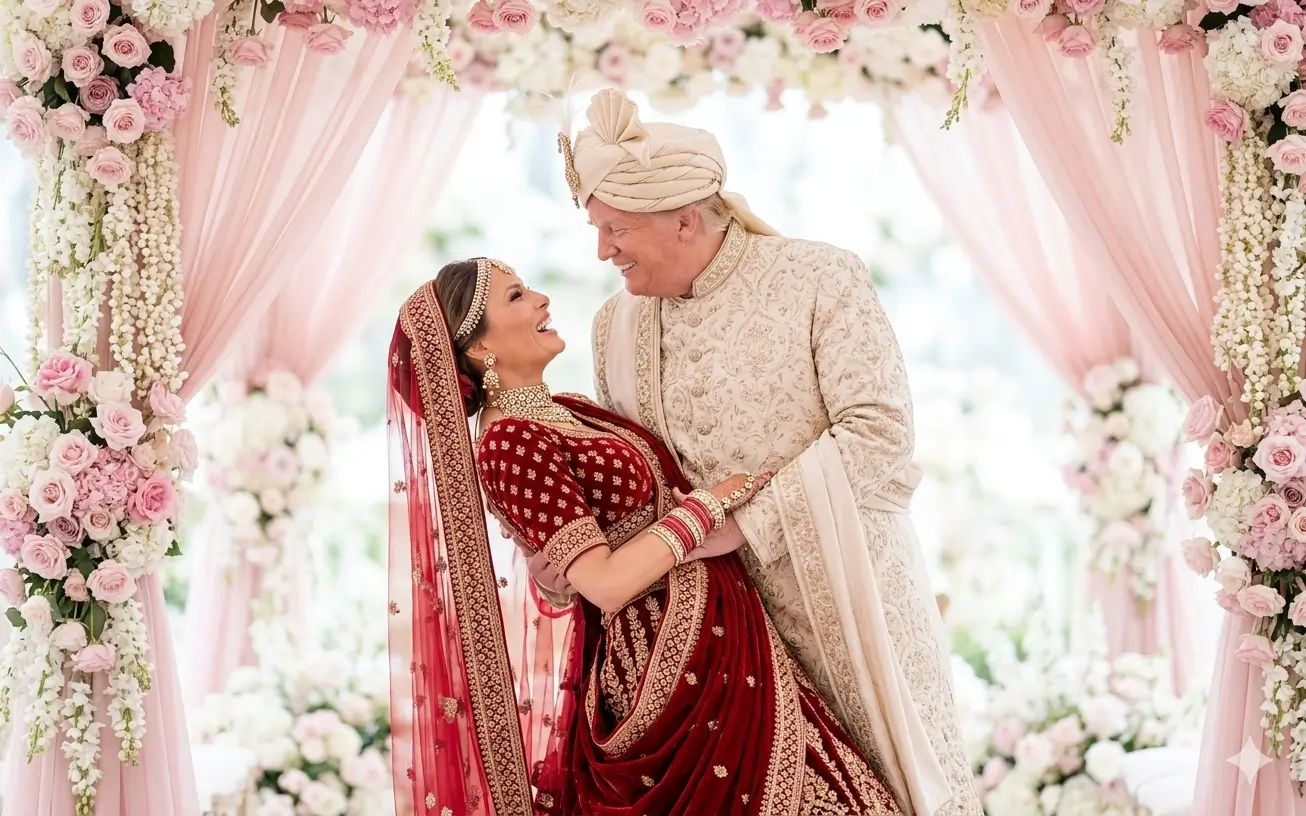
{
  "task": "image_generation",
  "concept": "dreamy_indian_wedding_portrait",
  "prompt": "A DREAMY, HIGH-END INDIAN WEDDING PORTRAIT OF A JOYFUL BRIDE AND GROOM IN A ROMANTIC POSE. THE GROOM, WEARING AN ELEGANT CREAM SHERWANI WITH INTRICATE COLD EMBROIDERY AND A MATCHING TURBAN, GENTLY DIPS THE BRIDE WHILE SMILING WARMLY. THE BRIDE IS DRESSED IN A LUXURIOUS DEEP RED BRIDAL LEHENGA ADORNED WITH HEAVY GOLD EMBROIDERY, TRADITIONAL JEWELRY, AND A SHEER RED DUPATTA DRAPED OVER HER HEAD. SHE LAUGHS JOYFULLY, LOOKING INTO THE GROOM'S EYES. THEY ARE STANDING UNDER A SOFT PASTEL PINK FLORAL MANDAP DECORATED WITH HANGING BLOSSOMS AND DELICATE DRAPERY. THE BACKGROUND IS BRIGHT, AIRY, AND SOFTLY BLURRED WITH WHITE TONES AND HINTS OF FLORAL ARRANGEMENTS, CREATING A LIGHT, ETHEREAL ATMOSPHERE. NATURAL SOFT LIGHTING, HIGH EXPOSURE, AND PASTEL COLOR GRADING ENHANCE THE ROMANTIC MOOD. HIGHLY DETAILED FABRICS, RICH TEXTURES, CANDID EMOTION, CINEMATIC COMPOSITION, SHALLOW DEPTH OF FIELD, PROFESSIONAL WEDDING PHOTOGRAPHY STYLE, 4K RESOLUTION.",
  "negative_prompt": "BLURRY, LOW QUALITY, DISTORTED FACES, EXTRA LIMBS, HARSH SHADOWS, OVERSATURATED COLORS, CLUTTERED BACKGROUND",
  "visual_style": [
    "cinematic composition",
    "professional wedding photography",
    "shallow depth of field",
    "4K resolution"
  ]
}
2. Modern Low-Angle Lockscreen Selfie NEW
Ditch the artificial AI look. This prompt is designed to strictly block CGI smoothing effects, generating an incredibly natural, pore-visible couple selfie from a trendy low-angle perspective. It is ideal for lockscreen aesthetics.
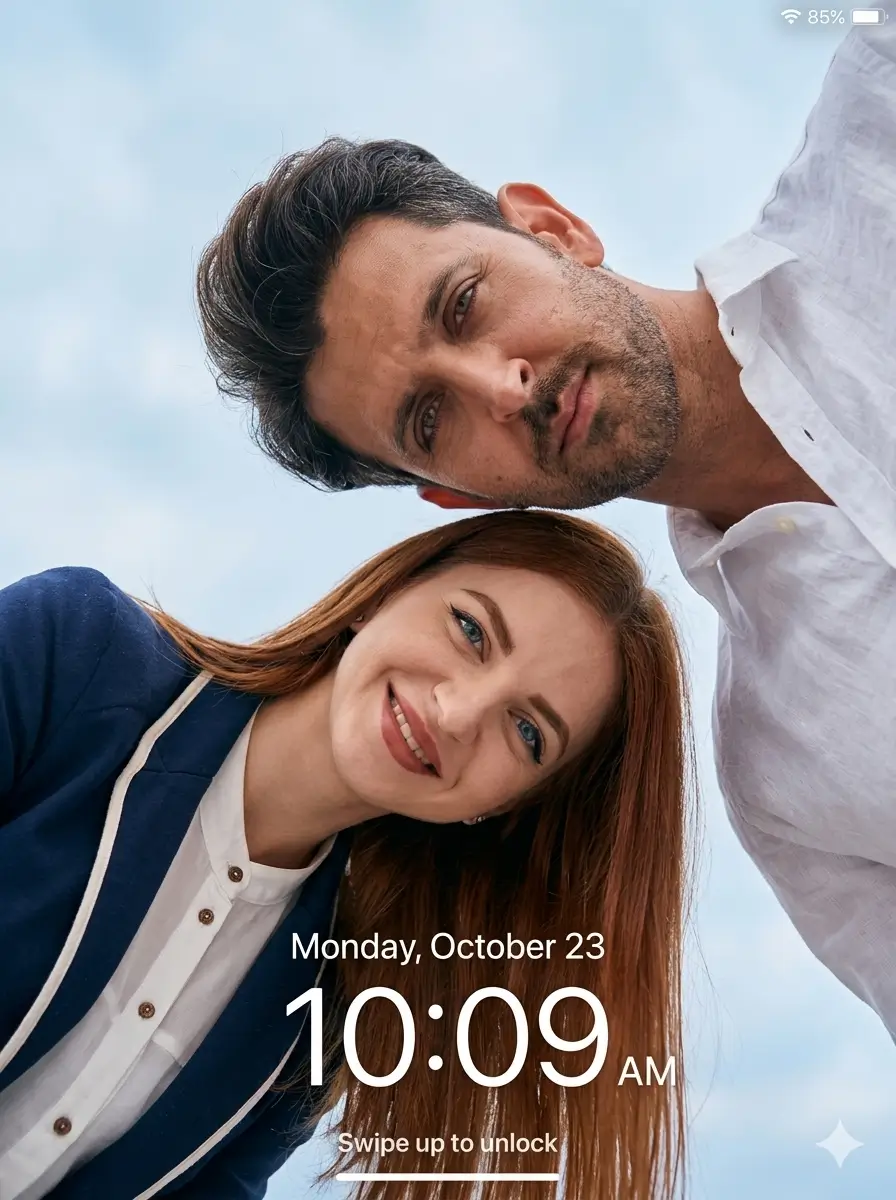
{
  "task": "image_generation",
  "concept": "low_angle_lockscreen_couple_selfie",
  "prompt": "Ultra-realistic cinematic low-angle couple portrait with lockscreen UI overlay, 8K DSLR quality, extremely sharp focus, zero blur, no artificial smoothing, no CGI look, no cartoon effect, hyper-realistic skin texture, fabric detail, and environment clarity.",
  "aspect_ratio": "3:4 vertical",
  "scene_definition": {
    "environment": "Open outdoor environment with a soft blue sky and light clouds covering the entire background",
    "sky_aesthetic": "Clean minimal sky aesthetic with no distractions"
  },
  "subject_definition": {
    "pose": "A young couple leaning toward the camera from above, captured in a low-angle perspective, creating a modern aesthetic selfie-style shot",
    "male_features": "Wheatish skin tone, short styled hair, light beard, sharp jawline, natural skin texture with pores visible",
    "female_features": "Fair to wheatish skin tone, smooth natural skin, long straight hair, soft facial features",
    "strict_rules": "Both faces completely natural, no smoothing, no beautification. Both leaning slightly forward."
  }
}
3. Seamless iPhone Split-Screen Interaction
Looking to create viral AI thumbnails prompts or the perfect matching backgrounds? This split screen iPhone wallpaper AI prompt perfectly blends two iPhones together to create a realistic, connected interaction between couples across two screens.
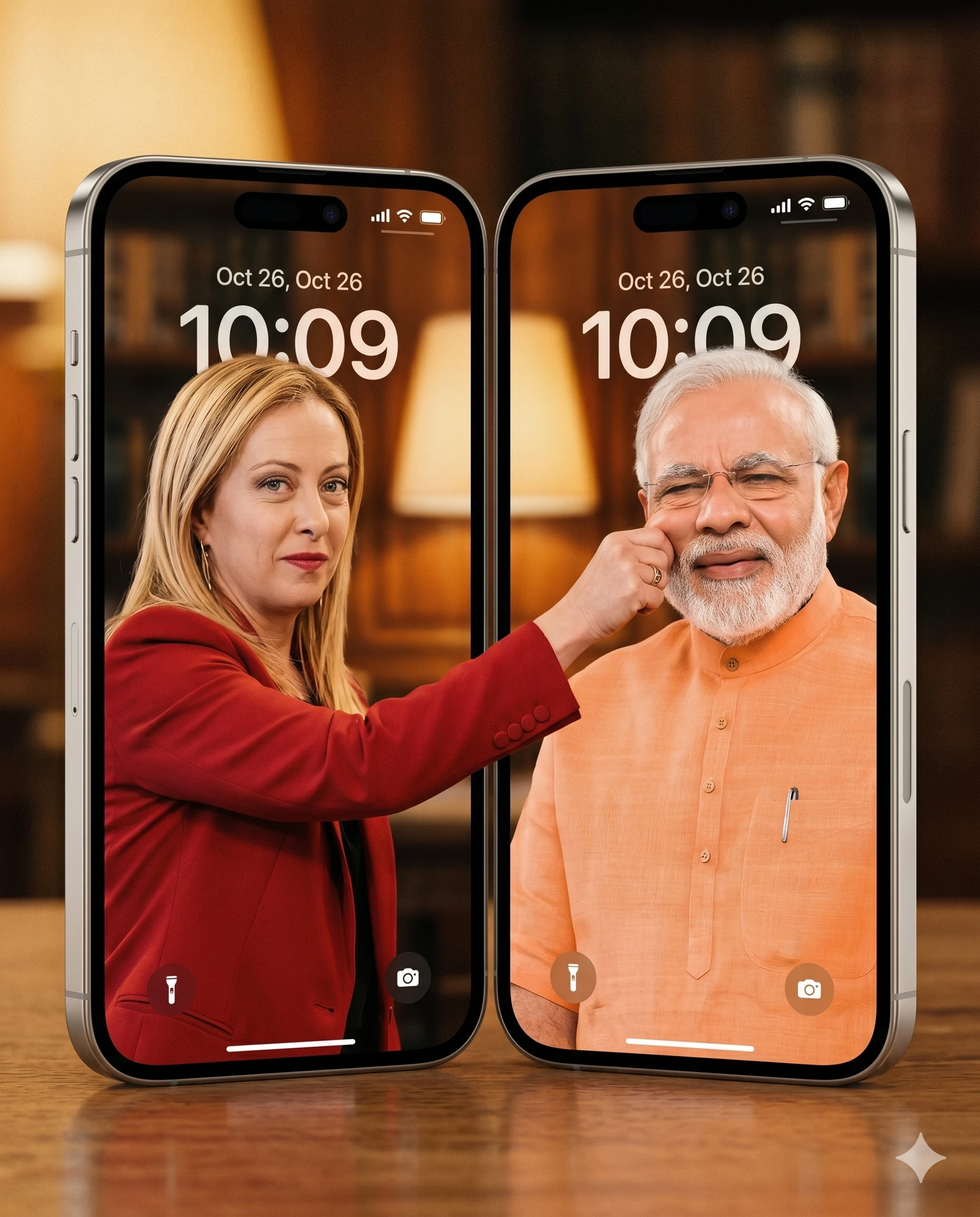
{
  "task": "image_generation",
  "concept": "split_screen_iphone_interaction",
  "prompt": "A split-screen image of two iPhones placed side-by-side. Both lock screen displays merge into one continuous, seamless wallpaper. On the left screen, a woman (matching the facial features and character of the uploaded reference photo) extends her hand past the screen border to the right side. On the right screen, a man (matching the facial features and character of the uploaded reference photo) reacts as his cheek is pinched with a funny and natural expression. The interaction looks seamless, as if both screens are connected in the same world. Use warm cinematic lighting with a vintage film grain texture. Facial details must be highly accurate (highly realistic face matching). The visual style is realistic, clean, and aesthetic, like a premium wallpaper.",
  "aspect_ratio": "4:5 (1080 × 1350 px)",
  "visual_style": [
    "warm cinematic lighting",
    "vintage film grain texture",
    "realistic and clean",
    "premium aesthetic"
  ]
}
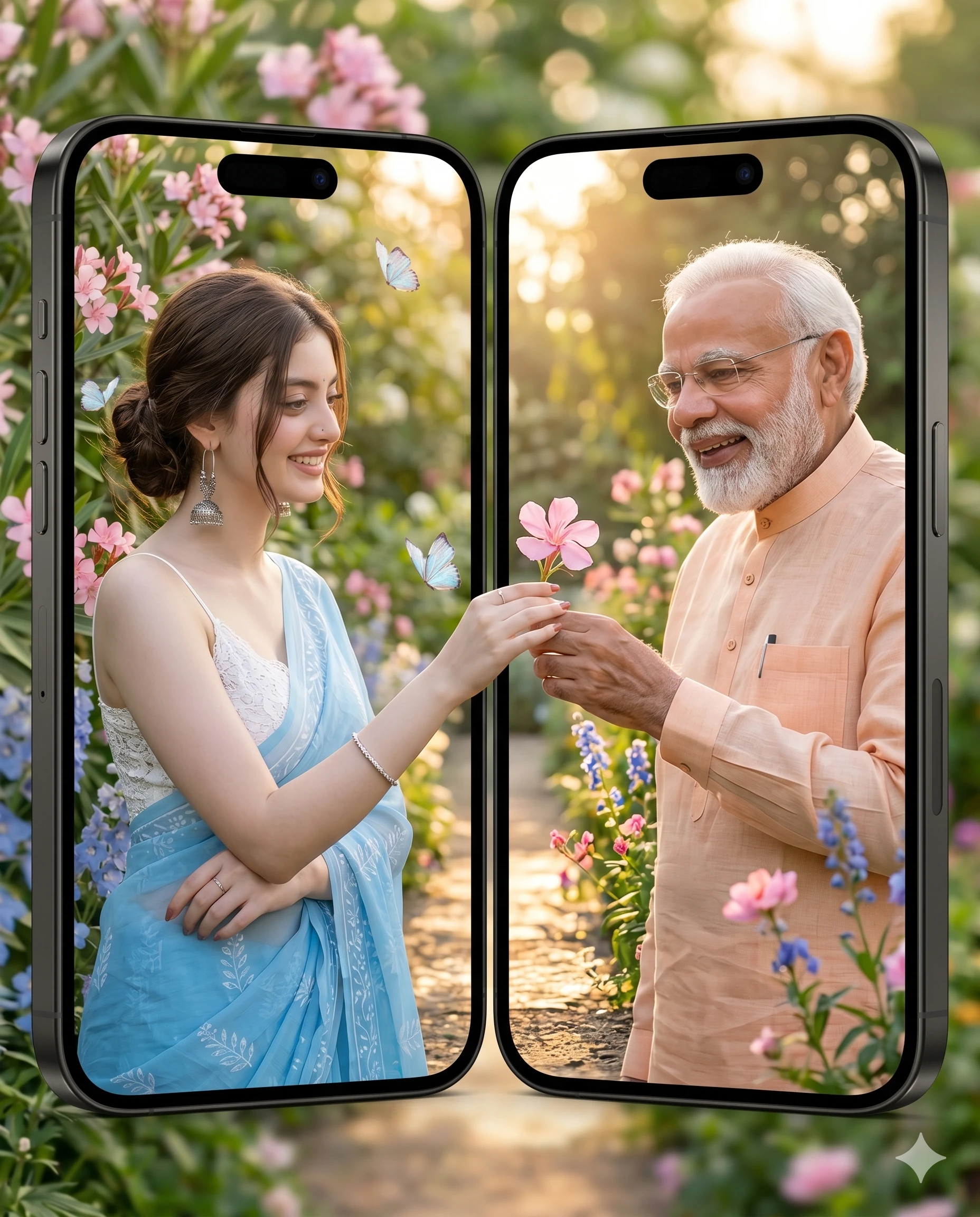
4. Merging Wallpaper: The Flower Gift
This is easily one of the most requested couple wallpaper AI prompts right now. It sets up a romantic golden-hour scene where a flower is passed seamlessly across the gap between two iPhone screens. It's a fantastic showcase of Google Gemini AI photo editing capabilities.
{
  "task": "image_generation",
  "concept": "merging_wallpaper_flower_exchange",
  "prompt": "Split-screen of two iPhones with a merging wallpaper. The woman on the left is handing a small flower across the screen to the man on the right. The man receives the flower with a happy smile and a warm expression. The background features an outdoor garden or a bright, romantic morning/golden hour setting. Fresh tones, soft lighting, and cinematic quality. High detail, very accurate facial resemblance, and ultra-realistic.",
  "aspect_ratio": "4:5 (1080 × 1350 px)",
  "negative_constraints": [
    "no text",
    "no watermark"
  ],
  "visual_style": [
    "fresh tones",
    "soft romantic lighting",
    "golden hour",
    "cinematic quality"
  ]
}
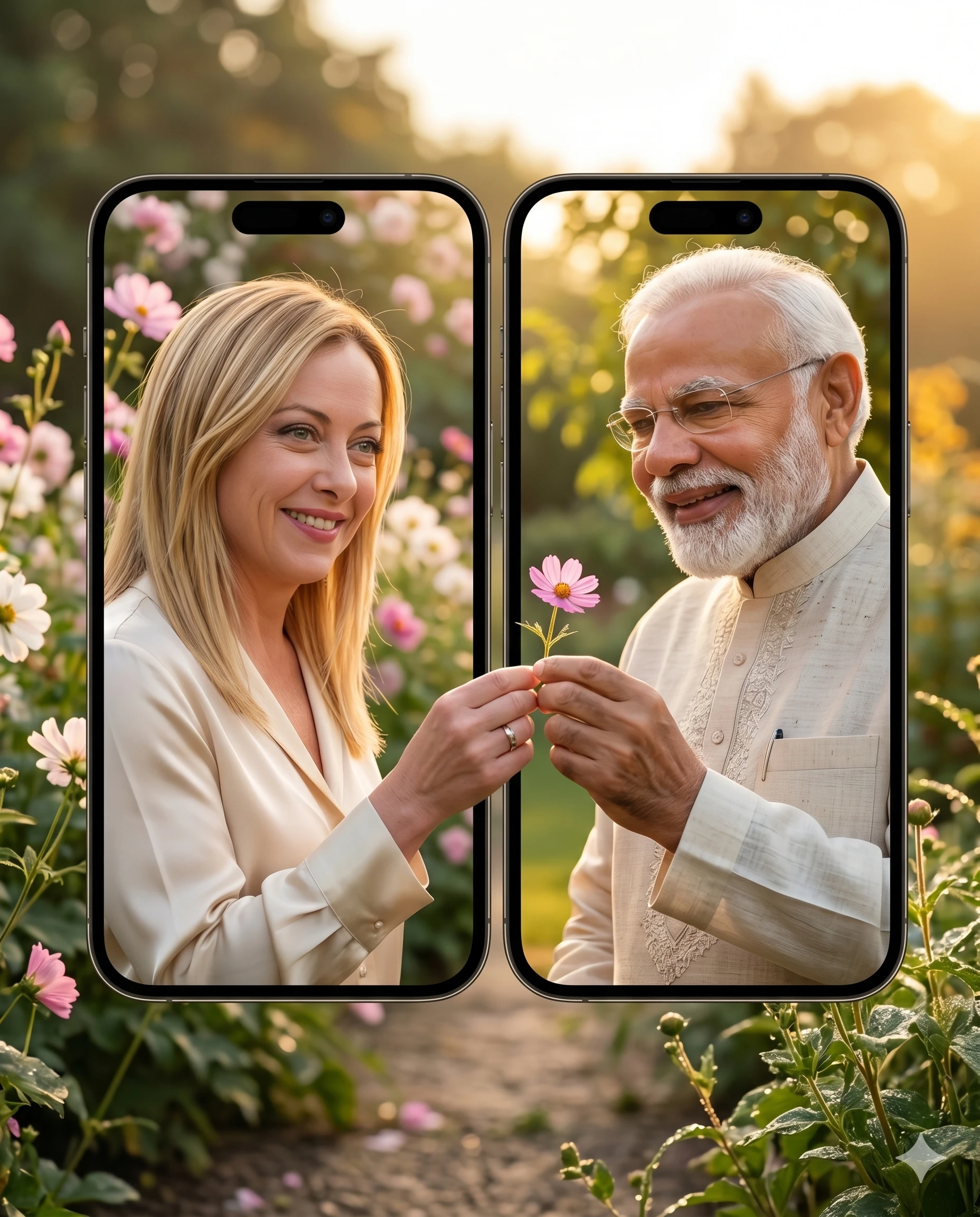
5. Golden Hour Split-Screen Match
An alternative take on the romantic split-screen wallpaper. Apply this prompt to your portraits for a perfectly synced outdoor garden aesthetic. If you've been searching for free AI prompts to turn a selfie into professional editor-level matching screens, this is it.
{
  "task": "image_generation",
  "concept": "merging_wallpaper_golden_hour",
  "prompt": "Split-screen of two iPhones with a merging wallpaper. The woman on the left is handing a small flower across the screen to the man on the right. The man receives the flower with a happy smile and a warm expression. The background features an outdoor garden or a bright, romantic morning/golden hour setting. Fresh tones, soft lighting, and cinematic quality. High detail, very accurate facial resemblance, and ultra-realistic.",
  "aspect_ratio": "4:5 (1080 × 1350 px)",
  "negative_constraints": [
    "no text",
    "no watermark"
  ]
}
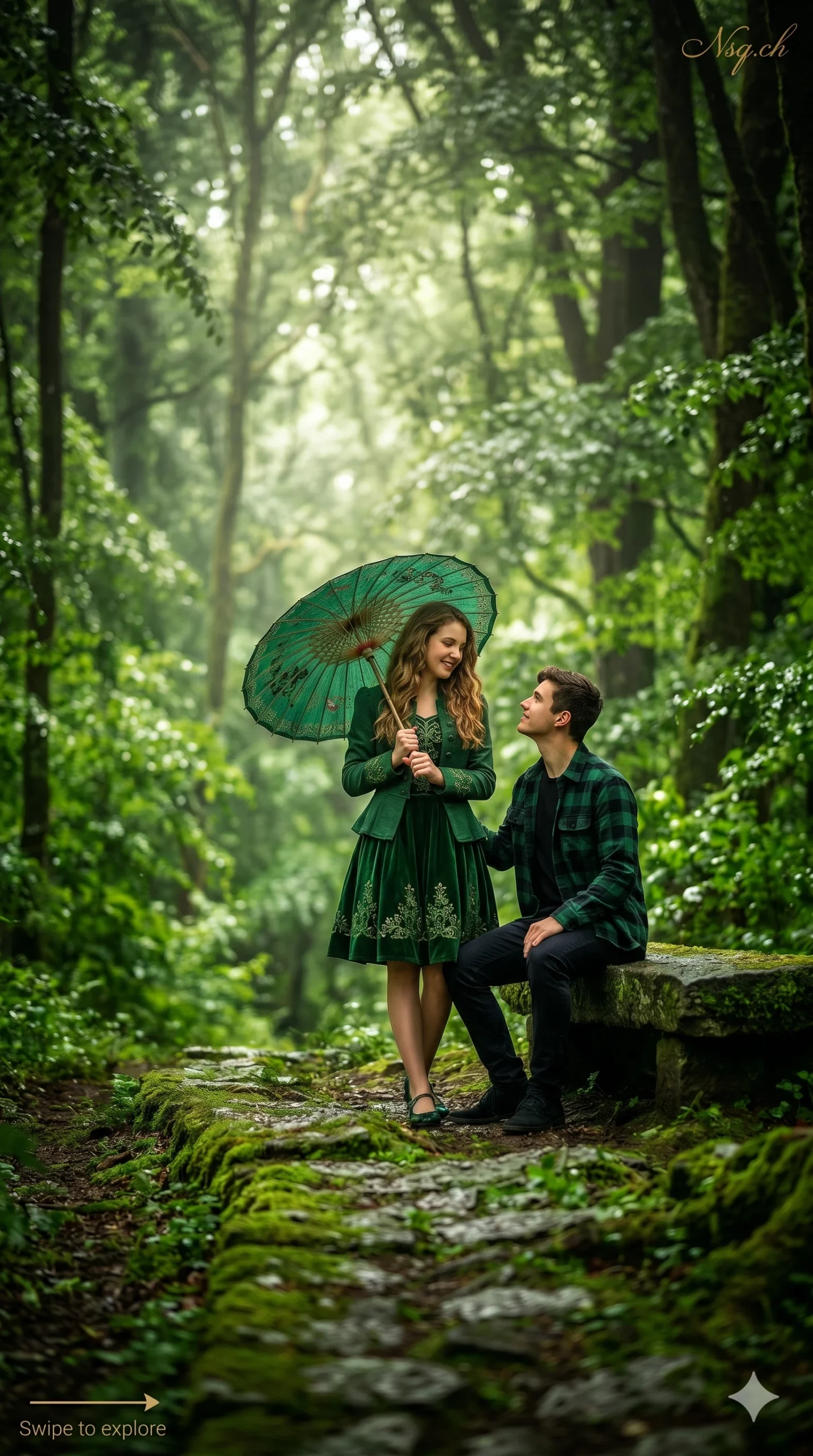
6. Fine-Art Dark Forest Portrait
Turn a standard photo into a moody, heavily stylized, and deeply atmospheric fantasy piece. If you are looking for a reliable Midjourney alternative photo prompts structure that works in GPT, this integrates specific graphic overlay details for an editorial finish using hyper realistic AI photo editing.
{
  "task": "image_editing",
  "concept": "moody_fine_art_fantasy",
  "prompt": "A deeply moody, heavily edited, and fine-art vertical portrait photo of the couple from image_0.png in the lush ancient forest. The color grade is enhanced for a fantasy-like deep green, with deeper shadows and luminous highlights. The girl is under her parasol, and the boy is seated on the stone bench. In the very top-right corner, there is a very small, thin, elegant script 'Nsq.ch' logo. In the absolute bottom-left corner, there is a subtle, thin-line swipe indicator graphic (with an arrow) and tiny, thin text saying 'Swipe to explore'. Both elements are minimal and non-disruptive.",
  "aspect_ratio": "9:16",
  "visual_style": [
    "deeply moody",
    "heavily edited fine-art",
    "fantasy-like deep green color grade",
    "deeper shadows",
    "luminous highlights"
  ]
}
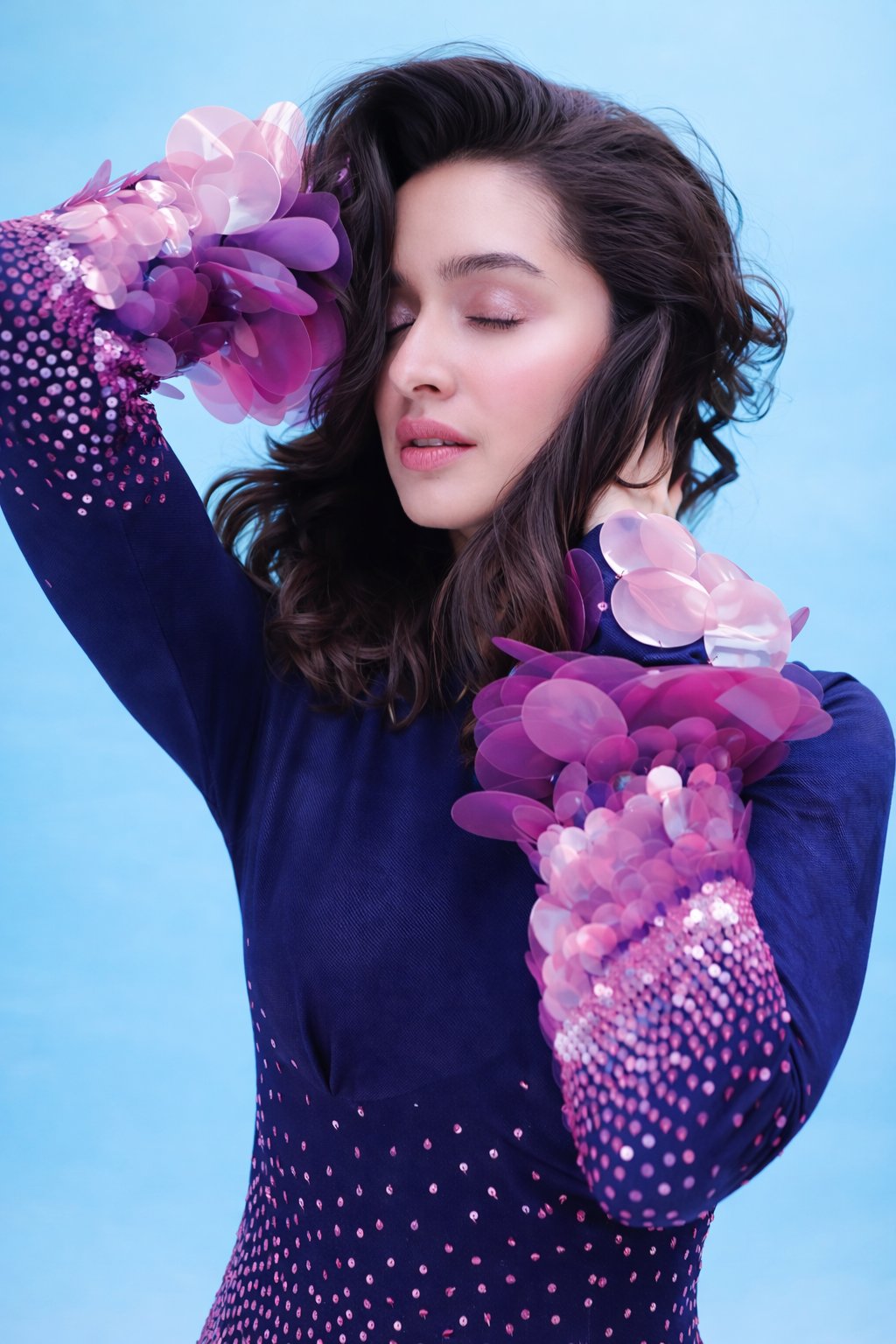
7. Absolute Pose & Outfit Reconstruction
This is your "Control Freak" JSON structure. It is an advanced pose and outfit reconstruction AI prompt engineered to lock the identity of your uploaded face while strictly reconstructing the posture defined in the code. This is what strict face preservation prompts ChatGPT Gemini users have been begging for.
{
  "task_type": "photo_editing",
  "editing_mode": "absolute_pose_and_outfit_reconstruction",
  "reference_policy": "internal_locked_visual_reference",
  "user_input": {
    "required": "single_face_photo",
    "role": "face_identity_source_only",
    "user_reference_upload": false
  },
  "absolute_rules": {
    "face_identity_must_be_preserved": true,
    "pose_must_match_defined_pose_exactly": true,
    "outfit_must_match_defined_outfit_exactly": true,
    "no_creative_variation_allowed": true,
    "no_style_interpretation": true
  },
  "face_identity_lock": {
    "enabled": true,
    "lock_strength": 1.0,
    "preserve_exact_identity": true,
    "protected_features": [
      "eye shape and spacing",
      "nose shape",
      "lip shape",
      "jawline",
      "cheek structure",
      "natural asymmetry",
      "skin realism"
    ],
    "allowed_face_edits": [
      "high_end_editorial_retouch",
      "skin tone balancing",
      "makeup application as specified",
      "lighting adaptation"
    ],
    "forbidden": [
      "face swap",
      "face regeneration",
      "identity blending",
      "beauty morphing",
      "AI face synthesis"
    ]
  },
  "locked_pose_definition": {
    "body_position": "standing",
    "torso": "slightly angled to camera",
    "left_arm": {
      "position": "raised upward",
      "elbow": "bent above head",
      "forearm": "crossing above forehead"
    },
    "right_arm": {
      "position": "bent",
      "hand": "resting behind neck or near collarbone",
      "fingers": "relaxed natural curve"
    },
    "head": {
      "tilt": "slight tilt toward raised arm",
      "orientation": "three-quarter profile",
      "chin": "slightly lowered"
    },
    "expression": {
      "eyes": "closed or softly lowered",
      "mouth": "relaxed, neutral",
      "emotion": "calm, serene, editorial"
    }
  },
  "locked_hair_definition": {
    "length": "shoulder_length",
    "style": "voluminous loose waves",
    "parting": "slightly off-center",
    "flow": "soft natural movement framing face",
    "finish": "salon-quality realistic texture"
  },
  "locked_outfit_definition": {
    "replace_original_clothing": true,
    "outfit_type": "form_fitting_long_sleeve_dress",
    "base_color": "deep navy blue",
    "fabric": "smooth stretch fabric",
    "sleeve_design": {
      "structure": "voluminous layered appliques",
      "shape": "circular petal-like elements",
      "material": "translucent semi-gloss",
      "colors": ["soft pink", "magenta", "light purple"],
      "density": "heavy near elbows, tapering toward forearms"
    },
    "dress_body_design": {
      "embellishment": "small reflective dots",
      "pattern": "gradient",
      "density_transition": "light near chest, dense toward waist and hips",
      "color_shift": "navy to pink-purple"
    }
  },
  "lighting_setup": {
    "type": "studio_soft_light",
    "quality": "diffused and even",
    "direction": "front-left dominant",
    "shadows": "minimal and smooth",
    "highlights": "gentle highlights on face and sleeve embellishments"
  },
  "background_setup": {
    "replace_background": true,
    "background_color": "solid light blue",
    "texture": "smooth seamless studio backdrop",
    "depth": "flat"
  },
  "camera_and_framing": {
    "aspect_ratio": "3:4",
    "orientation": "vertical",
    "shot_type": "medium fashion portrait",
    "crop": "head to upper thighs",
    "camera_angle": "eye level",
    "perspective": "slightly angled body, clean editorial framing"
  },
  "image_quality_targets": {
    "resolution": "8K_UHD",
    "sharpness": "very high",
    "detail": "hyper realistic",
    "noise": "none",
    "ai_artifacts": "not_allowed"
  },
  "negative_constraints": {
    "forbid": [
      "pose deviation",
      "different hand position",
      "different sleeve design",
      "fabric reinterpretation",
      "extra fingers",
      "deformed hands",
      "plastic skin",
      "blur",
      "low resolution",
      "creative styling changes"
    ]
  },
  "final_validation_checks": {
    "must_match": [
      "defined pose",
      "defined dress",
      "defined lighting",
      "defined background"
    ],
    "must_preserve": [
      "uploaded face identity"
    ],
    "reject_if": [
      "face looks like another person",
      "pose differs visibly",
      "dress design differs",
      "output looks AI generated"
    ]
  }
}
8. The "Green Blazer" Fashion Editorial
Turn a boring bedroom selfie into a Vogue-worthy shot. This prompt acts as a professional fashion editorial AI, applying a specific pastel green outfit and studio lighting while utilizing a strict face identity lock Gemini and ChatGPT respect.
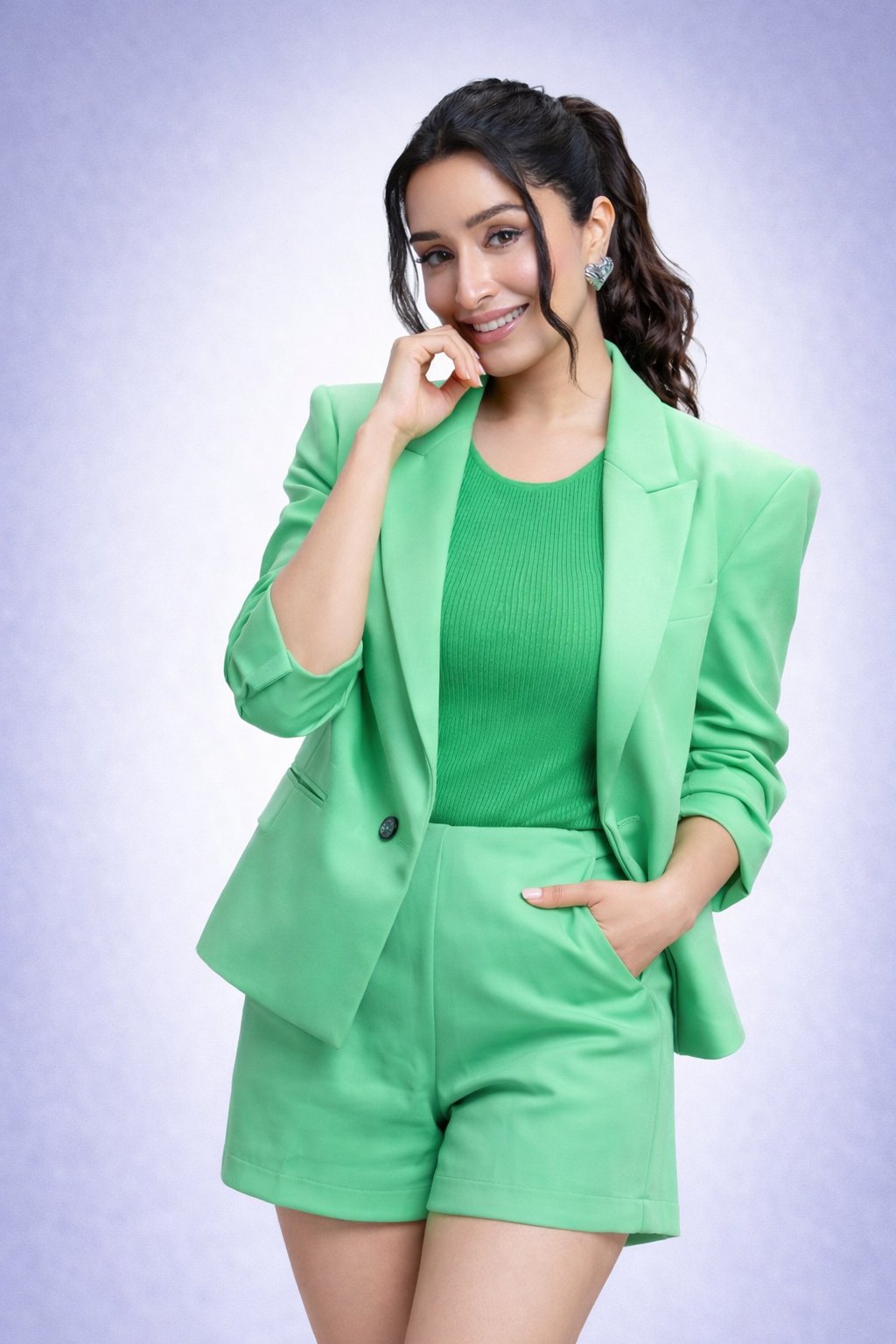
{
  "mode": "image_editing",
  "editing_intent": "transform any uploaded photo to match the reference image style while preserving facial identity",
  "base_image": "use_uploaded_image_only",
  "reference_style": "studio fashion portrait similar to the provided green blazer reference image",
  "identity_protection": {
    "facial_identity_lock": true,
    "preserve_original_face": true,
    "preserve_skin_tone": true,
    "preserve_age": true,
    "preserve_gender": true,
    "no_face_swap": true,
    "no_ai_face_generation": true
  },
  "pose_and_body_editing": {
    "apply_pose": "standing, front-facing with slight torso angle",
    "head_position": "slightly tilted to the right",
    "hand_positions": {
      "left_hand": "raised, fingers gently touching chin",
      "right_hand": "inserted into shorts or pants pocket"
    },
    "posture": "relaxed, confident, upright",
    "body_shape": "retain original body proportions without reshaping"
  },
  "wardrobe_transformation": {
    "outfit_override": true,
    "blazer": {
      "type": "tailored blazer",
      "color": "bright pastel green",
      "fit": "structured shoulders, relaxed premium fit",
      "sleeves": "long sleeves slightly rolled up",
      "button": "single dark button visible"
    },
    "inner_top": {
      "type": "sleeveless ribbed knit top",
      "color": "matching green",
      "neckline": "round neckline",
      "texture": "vertical ribbed fabric"
    },
    "bottom": {
      "type": "tailored shorts",
      "color": "matching green",
      "length": "mid-thigh",
      "fit": "structured yet slightly loose",
      "details": "clean hem, side pockets"
    }
  },
  "face_and_skin_editing": {
    "expression": "soft confident smile with visible teeth",
    "skin_texture": "natural realistic skin with visible pores, no plastic smoothing",
    "eyes": "sharp, realistic, natural reflections, clear whites",
    "makeup": {
      "style": "clean studio makeup",
      "base": "light natural finish",
      "blush": "subtle",
      "eye_makeup": "soft eyeliner and mascara",
      "lip_color": "natural pink tone"
    }
  },
  "hair_editing": {
    "style": "high ponytail",
    "texture": "smooth with slight natural wave",
    "loose_strands": "two soft strands framing the face",
    "enhancement": "increase strand clarity and natural shine",
    "style_lock": true
  },
  "accessories": {
    "earrings": {
      "type": "heart-shaped stud earrings",
      "material": "silver-toned",
      "size": "small and elegant",
      "reflection": "natural metallic reflection"
    }
  },
  "background_replacement": {
    "type": "studio backdrop",
    "gradient": "soft lavender to light purple premium gradient",
    "surface": "smooth, seamless, noise-free",
    "depth": "clean studio depth with no objects"
  },
  "lighting_adjustment": {
    "style": "soft professional studio lighting",
    "direction": "even frontal lighting",
    "shadows": "minimal, soft shadows",
    "highlights": "gentle highlights on face and blazer edges"
  },
  "quality_enhancement": {
    "sharpness": "high but natural",
    "noise_removal": "full",
    "color_balance": "cool-neutral with vibrant green contrast",
    "fabric_detail": "clear and realistic",
    "skin_detail": "clean and high resolution"
  },
  "final_output": {
    "look": "modern fashion editorial",
    "mood": "fresh, confident, polished",
    "resolution_target": "8K ultra high definition",
    "finish": "premium studio-grade realism"
  },
  "strict_restrictions": [
    "do not change facial identity",
    "do not alter facial structure",
    "no artificial beautification",
    "no cartoon or artistic style",
    "no logo, watermark, or text",
    "no crop or resize unless required by system"
  ]
}
9. Ramadan Photo Editing Prompt
Transform your portrait into a luxury cinematic scene. If you've been looking for the best Gemini prompts for Ramadan photo editing boys girls, this Ramadan hijab photo editing prompt preserves the face while adding elegant styling and a warm lantern glow. Looking for more seasonal ideas? Check out our dedicated Ramadan photo editing prompts guide.
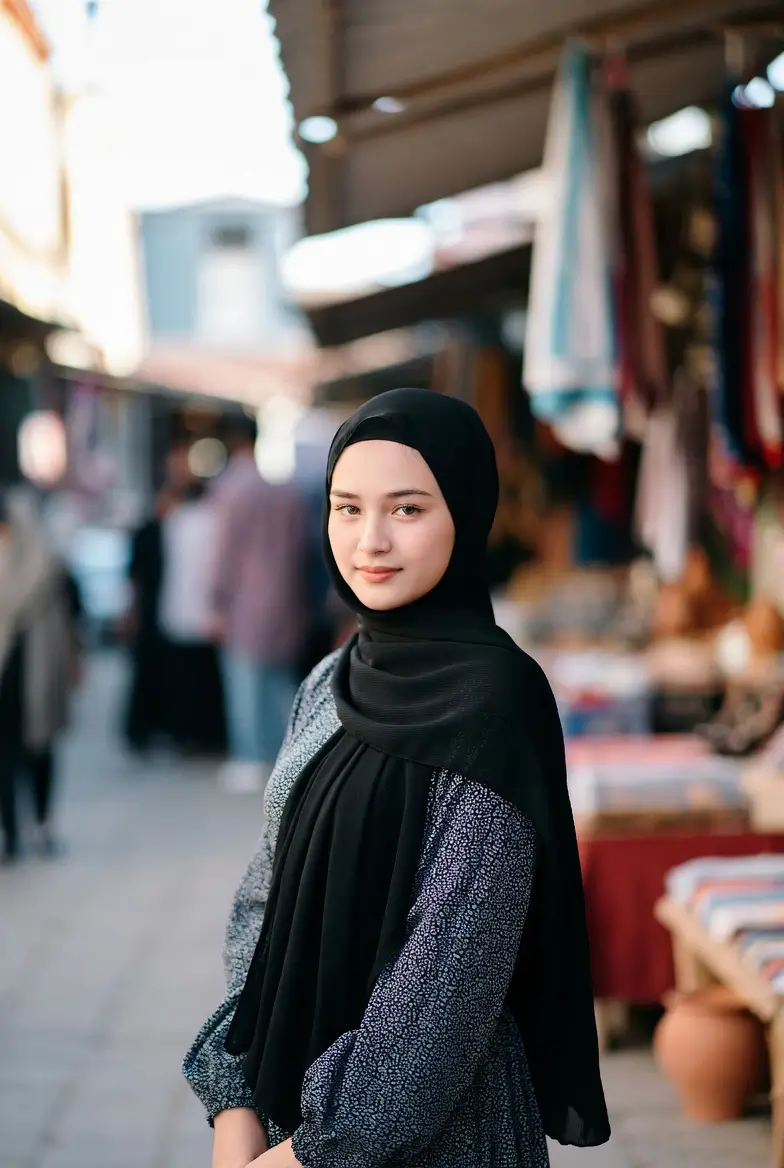
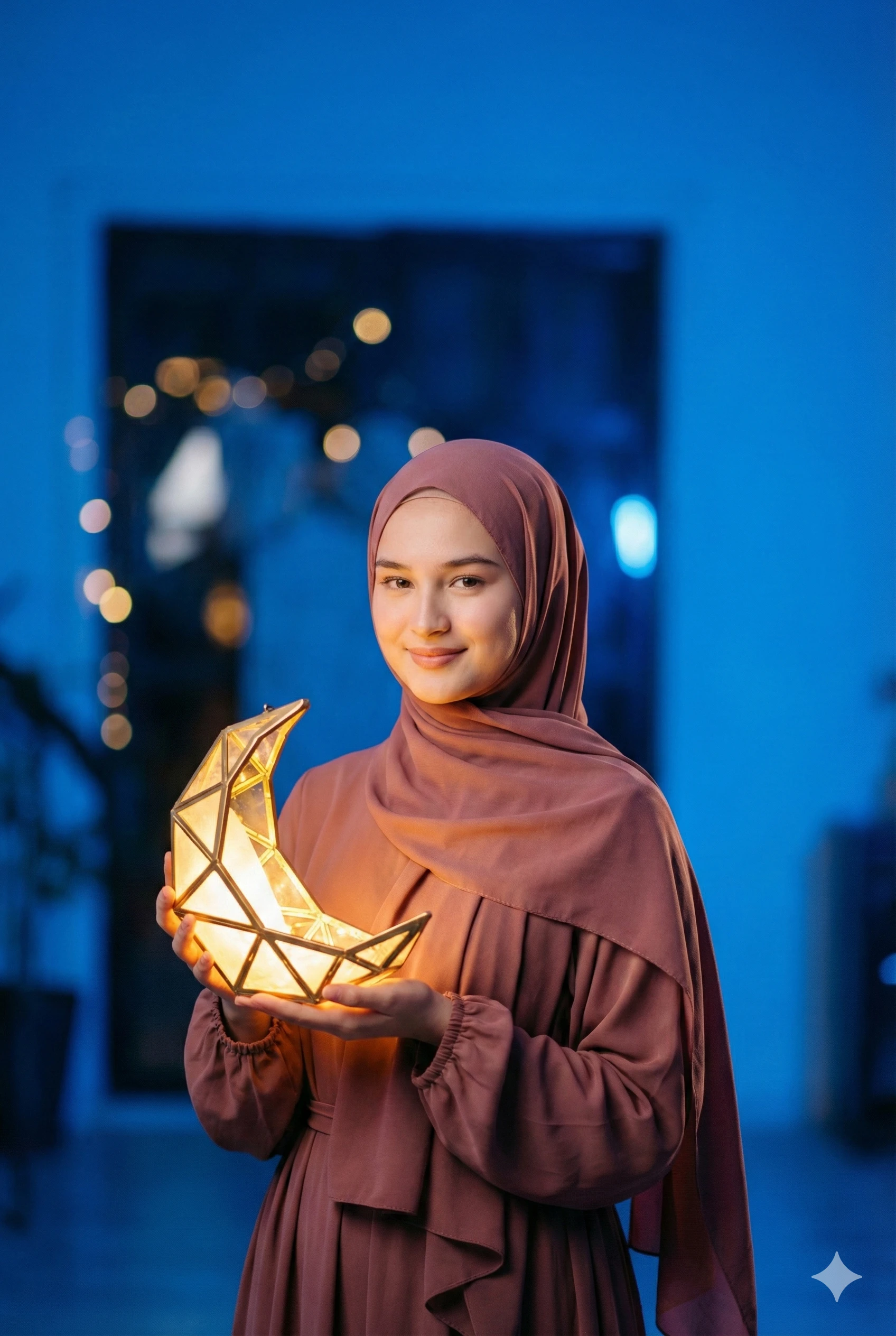
{
  "editing_prompt": {
    "core_instruction": "EDIT EXTERNAL ELEMENTS ONLY. MUST PRESERVE 100% OF UPLOADED PERSON'S EXACT FACE, FACIAL STRUCTURE, AND IDENTITY. NO CHANGES TO FACE. USE UPLOADED IMAGE AS SOURCE FOR ALL FACIAL FEATURES.",

    "critical_constraints": {
      "face_lock": "FREEZE FACE PIXELS: Do not alter, retouch, or regenerate any part of the face (eyes, nose, mouth, chin, cheekbones, jawline, eyebrows, skin texture, moles, freckles, expression). Face remains pixel-identical to uploaded image.",
      "resolution": "Output: 4K (minimum 3840px on long edge), exact original aspect ratio",
      "identity_preservation": "Subject must be immediately recognizable as the uploaded person. Zero facial deviation."
    },

    "edit_zones": {
      "face_and_head": {
        "status": "PROTECTED - NO EDITS ALLOWED",
        "note": "Original face serves as anchor. All other edits must work around these preserved pixels."
      },
      "hair_and_hijab": {
        "hijab": "Add/overlay modest rose hijab fabric AROUND (not over) original hair/head shape. Hijab must wrap in a way that appears to cover hair while preserving original head contour underneath.",
        "edges": "Blend hijab edges naturally with original hairline/forehead without altering skin"
      },
      "clothing": {
        "dress": "Replace clothing with flowing modest dress in muted rose tones, matching hijab. Dress shape must follow original body posture exactly."
      },
      "hands_and_props": {
        "hands": "Preserve original hand position/structure. Add luminous crescent-moon lantern held naturally in existing hand position.",
        "lantern": "Warm golden glow illuminating existing face from below without changing facial shadows"
      }
    },

    "environment": {
      "background": "Replace with cinematic studio: rich blue ambient lighting, soft spotlights",
      "lighting_interaction": {
        "on_face": "Add cool blue ambient fill light ONLY where original shadows allow. Add warm lantern reflection ONLY in existing eye highlights. Do not recast facial shadows.",
        "rule": "Lighting must appear to interact with ORIGINAL face geometry, not change it"
      },
      "depth": "Add shallow depth of field (background blur) while keeping subject fully sharp"
    },

    "execution_method": {
      "face_masking": "Create precise mask around original face/neck area. All edits occur OUTSIDE mask.",
      "blending": "Seamlessly blend new elements (hijab, dress, lantern) with preserved face using original skin tones and textures at boundaries",
      "quality": "4K output with enhanced fabric details, lighting effects, and studio quality while maintaining original face pixels"
    },

    "safety_checks": [
      "Before/after face comparison must show zero structural changes",
      "Original expression and gaze direction unchanged",
      "Skin texture and facial features identical",
      "If face changes, revert and adjust environmental edits instead"
    ],

    "visual_description_output": "Same woman from uploaded image, now wearing a modest rose hijab and modest dress, holding a glowing geometric crescent lantern in a blue cinematic studio. Her face is completely unchanged from original photo—same expression, features, and identity. Professional photography, luxury Ramadan mood."
  }
}
10. Ramadan Men's Portrait & Pose Fix
This biomechanically perfect pose fix AI prompt corrects posture and attire for men while keeping the face 100% identical. It creates a deeply dignified Men's Ramadan portrait AI edit with rich, cinematic Ramadan AI prompts lighting.
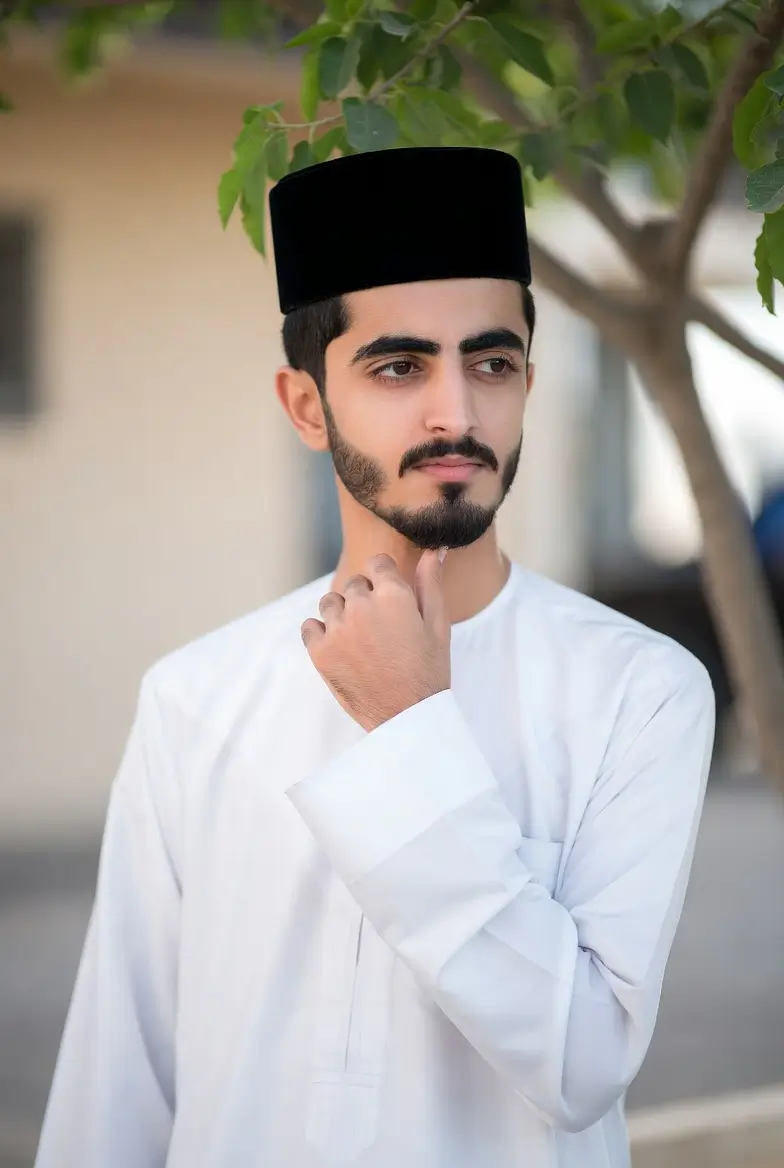

{
  "prompt_version": "4.0",
  "prompt_type": "face_preserving_editing_with_biomechanically_perfect_pose",
  "subject_gender": "male",

  "fidelity_requirements": {
    "face_preservation": "100% identity lock - zero changes to facial structure, skin texture, beard, expression, or gaze direction",
    "pose_fidelity": "Biomechanically perfect posture with natural weight distribution and anatomical correctness",
    "smile_preservation": "Maintain exact original smile intensity, lip curvature, and expression lines - no enhancement or reduction",
    "resolution": "4K UHD (3840×2160 minimum) with intelligent upscaling",
    "aspect_ratio": "Maintain original uploaded image ratio exactly",
    "protection_masks": {
      "face_mask": "Full protection of all facial pixels including smile lines and expression details",
      "body_reference": "Use original skeletal structure as biomechanical baseline for pose refinement"
    }
  },

  "biomechanical_pose_specifications": {
    "foundational_principles": [
      "Center of gravity aligned over feet",
      "Natural spinal curvature (cervical, thoracic, lumbar)",
      "Shoulder girdle relaxed and balanced",
      "Pelvis in neutral alignment",
      "Weight distribution: 60% back foot, 40% front foot"
    ],

    "pose_enhancement": {
      "head_position": {
        "action": "Maintain exact original head tilt and rotation",
        "constraint": "Zero alteration to facial angle or gaze direction",
        "biomechanics": "C7-T1 junction as pivot point for natural head carriage"
      },
      "facial_expression": {
        "action": "Preserve original smile exactly - including teeth visibility, lip compression, nasolabial folds",
        "enhancement": "Only adjust lighting to highlight natural smile features",
        "constraint": "No changes to muscle activation patterns"
      },
      "shoulder_alignment": {
        "action": "Refine to open, confident posture",
        "biomechanics": "Scapular retraction: 15-20°, clavicular elevation: 5-10°",
        "constraint": "Maintain original shoulder width and proportion"
      },
      "spine_curvature": {
        "action": "Optimize natural S-curve alignment",
        "specifications": "Cervical lordosis: 20-35°, Thoracic kyphosis: 20-40°, Lumbar lordosis: 30-50°",
        "constraint": "Maintain original torso length and proportions"
      },
      "arm_position": {
        "action": "Hold lantern with elegant, relaxed grip",
        "biomechanics": {
          "shoulder_flexion": "30-45°",
          "elbow_flexion": "100-120°",
          "wrist_neutral": "0-10° extension",
          "grip": "Relaxed power grip with thumb opposition"
        },
        "constraint": "Maintain original hand size and finger proportions"
      },
      "leg_stance": {
        "action": "Confident, grounded posture",
        "biomechanics": {
          "stance_width": "Shoulder-width or slightly narrower",
          "weight_distribution": "60% rear leg, 40% front leg",
          "knee_alignment": "Soft flexion (5-10°), not locked",
          "foot_angle": "Slight external rotation (5-15°)"
        },
        "constraint": "Maintain original leg length proportions"
      },
      "gaze_direction": {
        "action": "Looking directly at camera with engaged focus",
        "biomechanics": "Eyes aligned with camera lens, slight chin elevation for open airway",
        "constraint": "Preserve original eye shape, pupil size, and gaze intensity"
      }
    }
  },

  "editing_instructions": {
    "attire_integration": {
      "clothing": "Elegant traditional thobe in soft earth tones (sand/taupe) with perfect drape over biomechanically correct posture",
      "fit": "Tailored to follow natural body contours without distortion - shoulders aligned, waist defined, length proportional",
      "movement": "Fabric flows naturally from pose - slight billowing at hem from implied movement"
    },

    "prop_integration": {
      "lantern": "Crescent-moon lantern held in biomechanically correct hand position",
      "grip_reality": "Fingers wrap naturally around handle following power grip kinematics",
      "weight_manifestation": "Slight forearm engagement visible, lantern hangs naturally from grip"
    },

    "environment": {
      "studio": "Cinematic blue gradient backdrop with atmospheric depth",
      "grounding": "Subtle floor texture for spatial orientation and weight perception",
      "space": "Negative space above subject emphasizing upward gaze"
    },

    "lighting_for_pose": {
      "key_light": "45° top-down directional light emphasizing posture contours",
      "rim_light": "Backlight separation highlighting shoulder and head silhouette",
      "ambient_fill": "Cool blue (RGB: 30, 70, 130) at 35% opacity",
      "smile_accent": "Warm lantern glow (255, 225, 160) reflecting in smile lines and eyes",
      "posture_modeling": "Light sculpting to emphasize confident stance without altering anatomy"
    },

    "photography_specifications": {
      "lens_simulation": "85mm f/1.8 - natural compression, flattering proportions",
      "camera_angle": "30° overhead perspective creating heroic upward gaze",
      "depth_of_field": "Shallow (f/2.2) with gradual background blur",
      "composition": "Rule of thirds vertical alignment, centered horizontal"
    }
  },

  "technical_execution": {
    "process_sequence": [
      "1. Analyze original pose for biomechanical reference points",
      "2. Apply kinematic constraints to maintain proportional integrity",
      "3. Implement pose refinement within anatomical limits (max 15% joint angle adjustment)",
      "4. Apply full face protection mask with expression preservation",
      "5. Integrate clothing following biomechanically correct posture",
      "6. Position lantern using ergonomic grip principles",
      "7. Apply lighting that sculpts and enhances (not alters) posture",
      "8. Final render with 4K detail enhancement on non-facial elements only"
    ],

    "biomechanical_constraints": {
      "joint_limits": "All movements within normal human ROM ranges",
      "muscle_engagement": "Visible but not exaggerated",
      "balance_points": "Center of gravity within base of support",
      "breathing_pattern": "Posture allows for natural thoracic breathing"
    },

    "absolute_prohibitions": [
      "No facial structure changes",
      "No expression alteration (smile preserved exactly)",
      "No bone length or proportion changes",
      "No gaze direction modification",
      "No joint dislocation or hyperextension",
      "No unnatural weight shifts"
    ]
  },

  "quality_assurance": {
    "pose_validation": [
      "Biomechanically plausible weight distribution",
      "Natural spinal alignment visible through clothing",
      "Relaxed but confident muscle tone",
      "Grounded stance with clear center of gravity",
      "Engaged but natural smile preserved exactly"
    ],
    "identity_verification": [
      "Side-by-side comparison shows identical face",
      "Smile curvature and intensity unchanged",
      "Facial landmarks align perfectly",
      "Recognition factor: 100% match to original"
    ],
    "aesthetic_checks": [
      "Heroic but natural upward gaze",
      "Confident but not arrogant posture",
      "Traditional elegance with modern execution",
      "Cinematic lighting enhances but doesn't distort"
    ]
  },

  "final_output_specifications": {
    "image_quality": "4K UHD, 16-bit color, professional color grading",
    "emotional_tone": "Confident warmth, approachable dignity, spiritual presence",
    "style_category": "Modern traditional portraiture",
    "intended_impact": "Heroic but human, elegant but authentic, timeless yet contemporary"
  },

  "final_description": "A Middle Eastern man in elegant traditional earth-tone attire, standing with biomechanically perfect confident posture, holding a glowing crescent lantern. He looks directly at the camera with his original warm smile preserved exactly. His face remains 100% unchanged from the uploaded image - identical smile, expression, and features. Shot from a dramatic overhead angle in a cinematic blue studio, with professional lighting that sculpts his perfect posture. Premium Ramadan aesthetic with scientifically correct pose mechanics and preserved facial identity."
}
11. Strict Identity-Preserving Enhancement
This prompt is for when you love the photo but hate the quality. If you have a grainy or low-light memory, this identity preserving enhancement low light photo AI prompt performs what we call a "Strict identity preserving enhancement", making the photo crystal clear without turning you into a digital avatar.
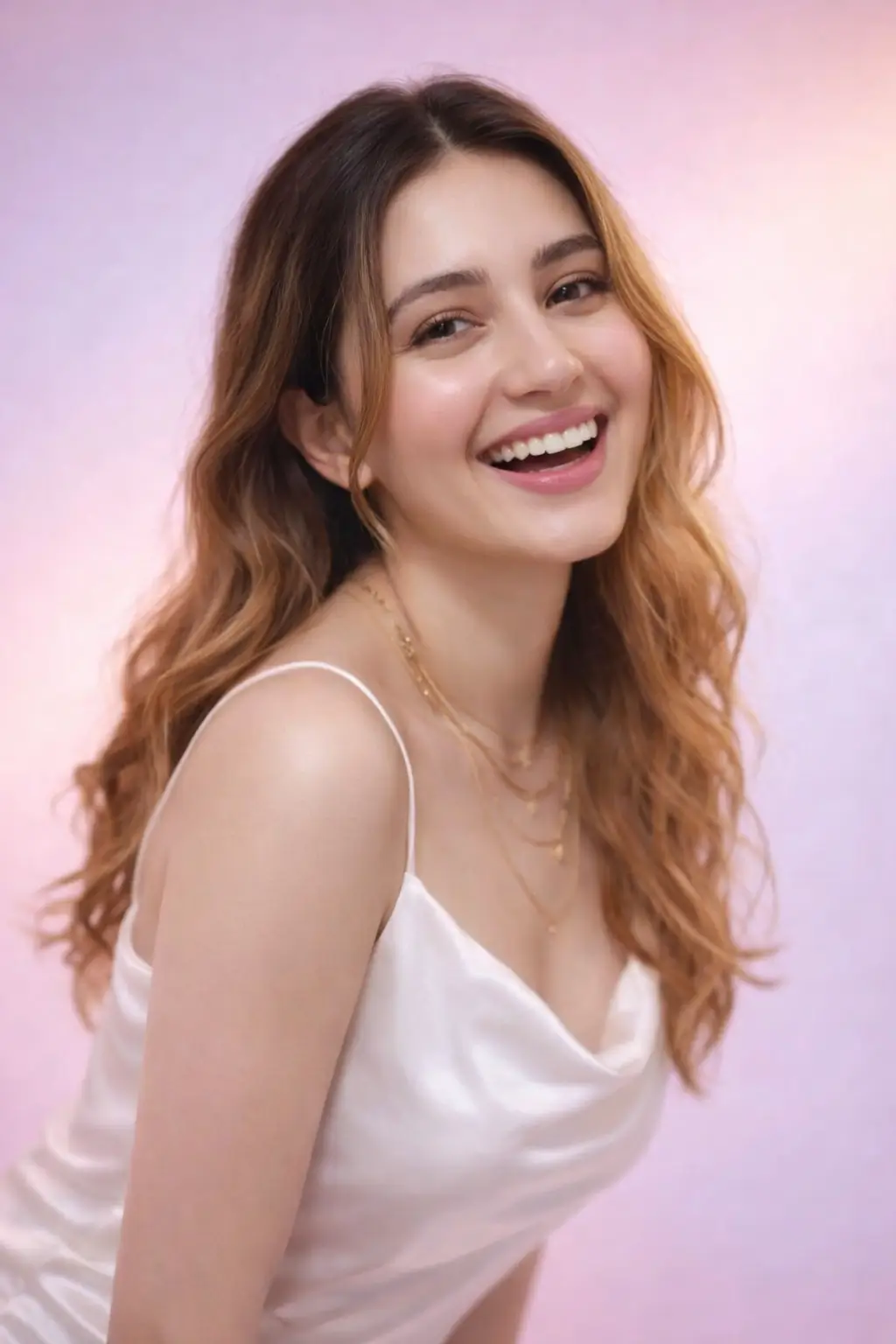
{
  "task_type": "image_editing_only",
  "editing_mode": "strict_identity_preserving_enhancement",
  "generation_disabled": true,
  "core_directive": "EDIT AND ENHANCE THE UPLOADED IMAGE ONLY. THE OUTPUT MUST BE A DIRECT, REALISTIC, AND HIGH-QUALITY DERIVATIVE OF THE UPLOADED PHOTO. THE SUBJECT’S IDENTITY MUST REMAIN 100% ORIGINAL, REAL, AND UNCHANGED.",
  "identity_reference": {
    "sole_source": "uploaded_image",
    "external_reference": "not_allowed",
    "ai_face_creation": false
  },
  "identity_lock": {
    "enabled": true,
    "lock_strength": 1.0,
    "identity_integrity": "absolute",
    "must_preserve_exactly": [
      "facial bone structure",
      "face shape",
      "eye shape, size, and spacing",
      "nose structure",
      "lip shape and proportions",
      "jawline and chin",
      "natural asymmetry",
      "overall likeness and recognizability"
    ],
    "allowed_face_actions": [
      "high-end editorial skin retouch",
      "minor blemish cleanup",
      "realistic skin tone balancing",
      "lighting adaptation without geometry change"
    ],
    "strictly_forbidden": [
      "face swap",
      "face regeneration",
      "identity blending",
      "beauty morphing",
      "facial geometry alteration",
      "identity enhancement through AI synthesis"
    ]
  },
  "subject_handling": {
    "identity": "person from uploaded image only",
    "face_processing": {
      "use_uploaded_face_as_exact_template": true,
      "texture": "preserve real skin pores",
      "realism": "photographic, non-synthetic",
      "expression_rules": "enhance only if naturally plausible for the same face"
    }
  },
  "image_quality": {
    "output_resolution": "4K_UHD",
    "pixel_quality": "ultra_high",
    "sharpness": "high but natural",
    "detail_retention": "maximum",
    "noise": "none",
    "compression_artifacts": "not_allowed"
  },
  "lighting_and_color": {
    "lighting_adjustment": "realistic studio-grade enhancement",
    "lighting_constraint": "must respect original facial geometry",
    "color_grading": "clean, realistic, editorial",
    "skin_tone_rule": "maintain natural skin color accuracy"
  },
  "post_processing": {
    "retouch_style": "professional high-end photo retouch",
    "clarity": "enhanced without oversharpening",
    "contrast": "balanced",
    "artifact_removal": [
      "banding",
      "halos",
      "ai skin artifacts",
      "edge distortions"
    ]
  },
  "negative_constraints": {
    "forbid": [
      "different face",
      "identity drift",
      "morphed features",
      "synthetic or fake-looking skin",
      "plastic or waxy texture",
      "cartoon",
      "anime",
      "3D render",
      "painting",
      "stylized portrait",
      "uncanny valley appearance"
    ]
  },
  "final_validation": {
    "must_pass": [
      "face is unmistakably the same person as the uploaded image",
      "identity is 100% original and real",
      "no facial structure changes",
      "output is true 4K ultra quality",
      "image looks like a real photograph, not AI-generated"
    ],
    "reject_if": [
      "viewer questions identity authenticity",
      "face appears beautified beyond realism",
      "any AI-generated facial traits are visible"
    ]
  },
  "system_instruction": "[CRITICAL: Treat the uploaded image as ground-truth reality. Perform enhancement only. The result must look like the same real person photographed with a better camera, lighting, and retouching — not a recreated or generated face.]"
}
12. Surreal Composition: The Pepsi Splash
Want to create a scroll-stopping advertisement? This is one of the best surreal composition AI prompts (e.g., Pepsi splash style). It locks your identity into a complex, physically simulated scene involving liquid physics.
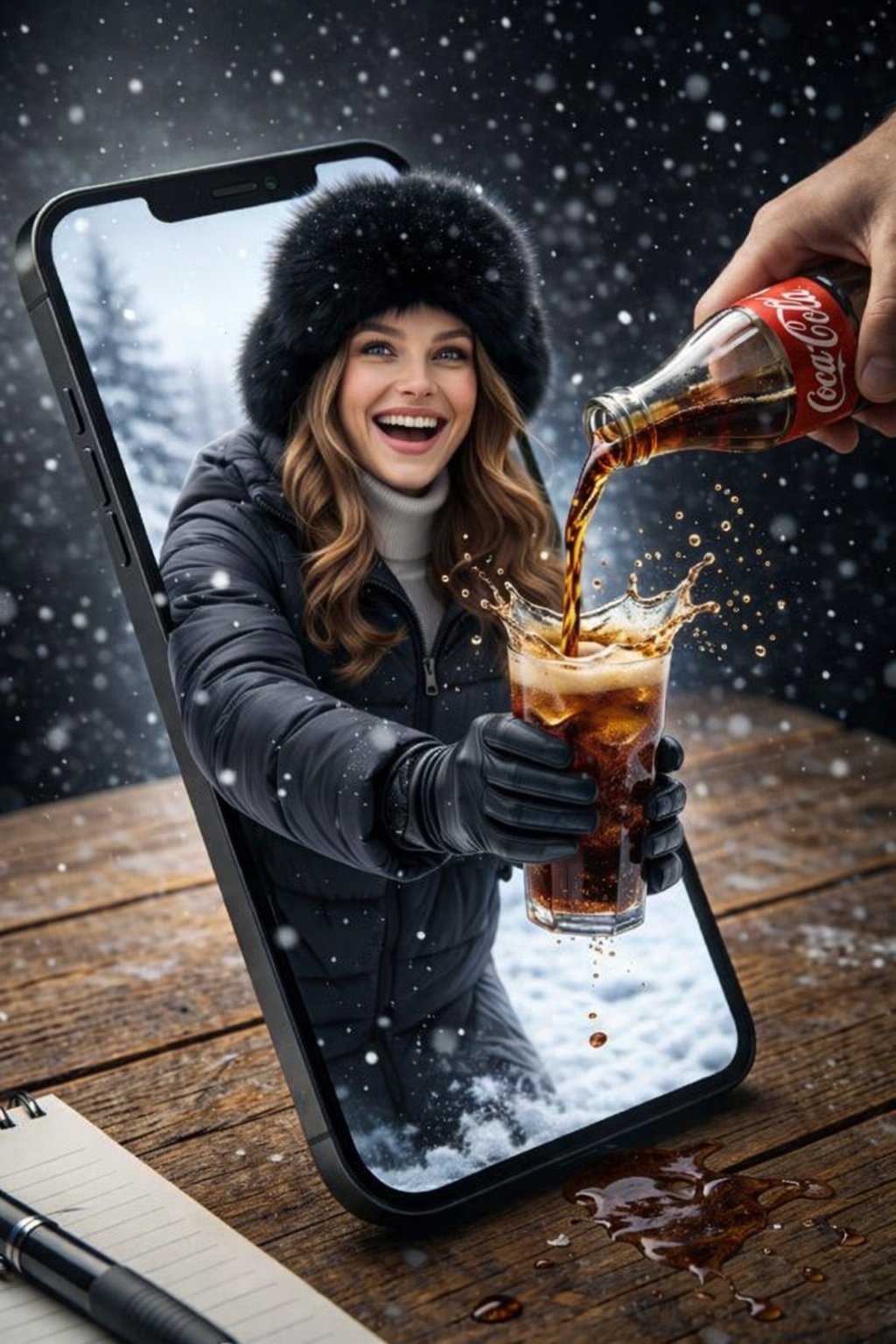
{
  "task_type": "image_editing_only",
  "editing_mode": "identity_locked_scene_composition",
  "generation_disabled": true,
  "core_directive": "EDIT THE UPLOADED IMAGE TO PLACE THE SAME REAL PERSON INTO THE DEFINED SCENE. THE SUBJECT’S FACE MUST COME EXCLUSIVELY FROM THE UPLOADED IMAGE AND REMAIN 100% ORIGINAL, REAL, AND UNCHANGED. NO NEW FACE MAY BE GENERATED.",
  "identity_reference": {
    "sole_source": "uploaded_image",
    "external_references": "not_allowed",
    "face_generation": false
  },
  "identity_lock": {
    "enabled": true,
    "lock_strength": 1.0,
    "must_preserve_exactly": [
      "facial bone structure",
      "face shape",
      "eye shape and spacing",
      "nose structure",
      "lip shape",
      "jawline",
      "natural asymmetry",
      "overall likeness"
    ],
    "allowed_face_edits": [
      "realistic lighting integration",
      "minor skin cleanup",
      "color balance matching scene",
      "natural expression alignment"
    ],
    "strictly_forbidden": [
      "face swap",
      "face regeneration",
      "identity blending",
      "beauty morphing",
      "facial geometry change"
    ]
  },
  "output_quality": {
    "resolution": "8K_UHD (minimum 4K true detail)",
    "sharpness": "ultra_high but photorealistic",
    "noise": "none",
    "dynamic_range": "high",
    "realism": "photorealistic"
  },
  "scene_definition": {
    "scene_type": "surreal product-style composition",
    "style": "photorealistic AI-edited composite with cinematic realism"
  },
  "camera": {
    "angle": "slightly elevated top-down",
    "focus": "sharp foreground, shallow depth of field",
    "lens_effects": [
      "natural depth of field",
      "high clarity",
      "macro-level liquid detail"
    ]
  },
  "environment": {
    "surface": "wooden table with visible natural grain",
    "lighting": {
      "type": "soft natural daylight",
      "direction": "upper left",
      "shadows": "soft realistic shadows under all objects"
    },
    "background": {
      "indoor": true,
      "elements": [
        "blurred interior background",
        "snowy outdoor scenery visible only inside phone screen (variant)"
      ]
    }
  },
  "main_object": {
    "smartphone": {
      "position": "lying flat on wooden table",
      "orientation": "vertical portrait",
      "color": "black",
      "screen_state": "cracked glass with radial fracture lines",
      "interaction": "screen appears broken outward allowing subject to emerge"
    }
  },
  "human_subject": {
    "identity_source": "uploaded_image_face_only",
    "visibility": "upper body emerging through phone screen",
    "expression": "wide natural smile, visible teeth",
    "eye_direction": "looking toward viewer",
    "gender_presentation": "female-presenting",
    "hair": {
      "color": "light brown (match uploaded image tone)",
      "style": "loose shoulder-length",
      "realism": "natural strand behavior"
    },
    "face_integration_rule": "map uploaded face onto scene body without altering facial structure"
  },
  "wardrobe_variants": [
    {
      "context": "indoor",
      "outfit": "casual neutral top",
      "visibility": "partially visible behind phone screen"
    },
    {
      "context": "winter scene inside phone",
      "outfit": [
        "dark padded jacket",
        "light turtleneck sweater",
        "black gloves",
        "black fur hat"
      ]
    }
  ],
  "action": {
    "primary": "cola being poured into transparent plastic cup",
    "motion_state": "liquid splash frozen mid-air",
    "liquid_physics": [
      "visible carbonation bubbles",
      "realistic splash droplets",
      "overflow splash behavior"
    ]
  },
  "beverage": {
    "type": "cola",
    "cup": {
      "material": "transparent plastic",
      "contents": "dark soda with ice",
      "branding": "Pepsi logo clearly visible"
    },
    "bottle": {
      "material": "plastic",
      "branding": "Pepsi label visible",
      "surface_detail": "condensation droplets",
      "interaction": "held by realistic human hand entering frame from top right"
    }
  },
  "secondary_objects": [
    {
      "object": "book",
      "position": "left of phone",
      "color": "light beige",
      "state": "closed"
    },
    {
      "object": "pen",
      "position": "near book",
      "color": "black",
      "orientation": "diagonal"
    }
  ],
  "effects": {
    "surreal_elements": [
      "subject emerging from phone screen",
      "interaction between digital and physical space"
    ],
    "particles": [
      "liquid droplets",
      "snow particles (winter variant)"
    ],
    "glass_effects": [
      "cracked screen shards",
      "realistic reflections and refractions"
    ]
  },
  "color_palette": {
    "dominant_colors": [
      "warm wood brown",
      "black",
      "deep cola brown",
      "blue and red branding accents"
    ],
    "contrast": "high contrast between warm table and cool screen tones"
  },
  "post_processing": {
    "clarity": "high micro-detail",
    "sharpness": "ultra-sharp",
    "noise": "none",
    "artifact_removal": [
      "edge halos",
      "AI skin artifacts",
      "liquid distortion errors"
    ]
  },
  "mood": "playful, surreal, visually striking",
  "negative_constraints": {
    "forbid": [
      "different face",
      "identity drift",
      "face regeneration",
      "generic AI face",
      "plastic skin",
      "distorted anatomy",
      "cartoon",
      "anime",
      "3D render",
      "painting look"
    ]
  },
  "final_validation": {
    "must_pass": [
      "face is unmistakably the same as uploaded image",
      "identity is 100% real and original",
      "scene looks physically believable",
      "output meets true 4K+ quality",
      "no visible AI face artifacts"
    ],
    "reject_if": [
      "face looks generated",
      "identity altered",
      "scene breaks realism unintentionally"
    ]
  },
  "system_instruction": "[CRITICAL: Treat the uploaded face as immutable ground truth. Build the surreal scene around the real person without altering their facial identity. The final image must look like a real photograph composited into a surreal but believable setup.]"
}
13. Fashion Scene Reconstruction (Melis Sezen Style)
Here, we are not stealing an identity; we are stealing a vibe. Use these reference photos to run this Melis Sezen style fashion scene reconstruction prompt, which lets you reconstruct a specific high-fashion pose without morphing into the celebrity.
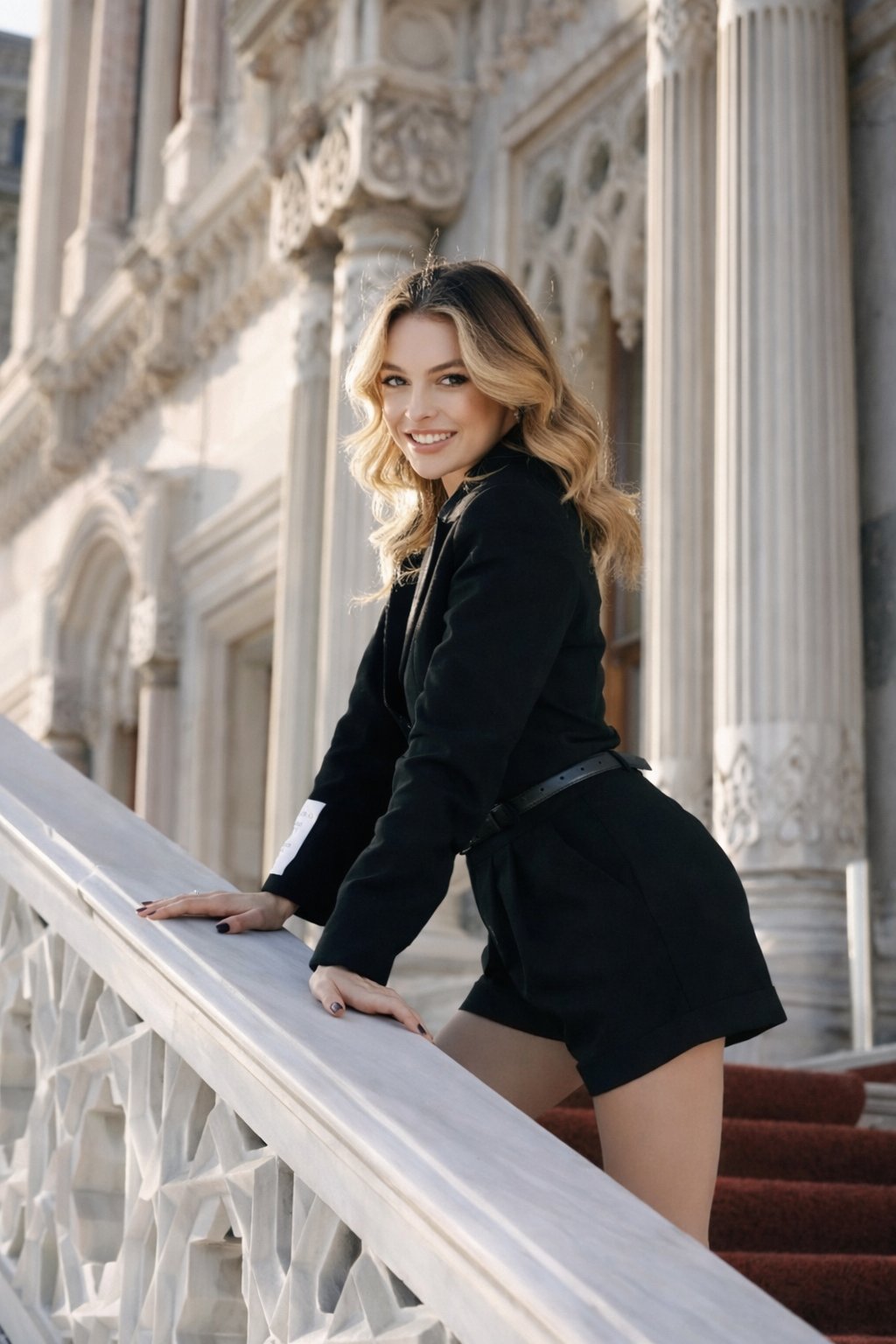
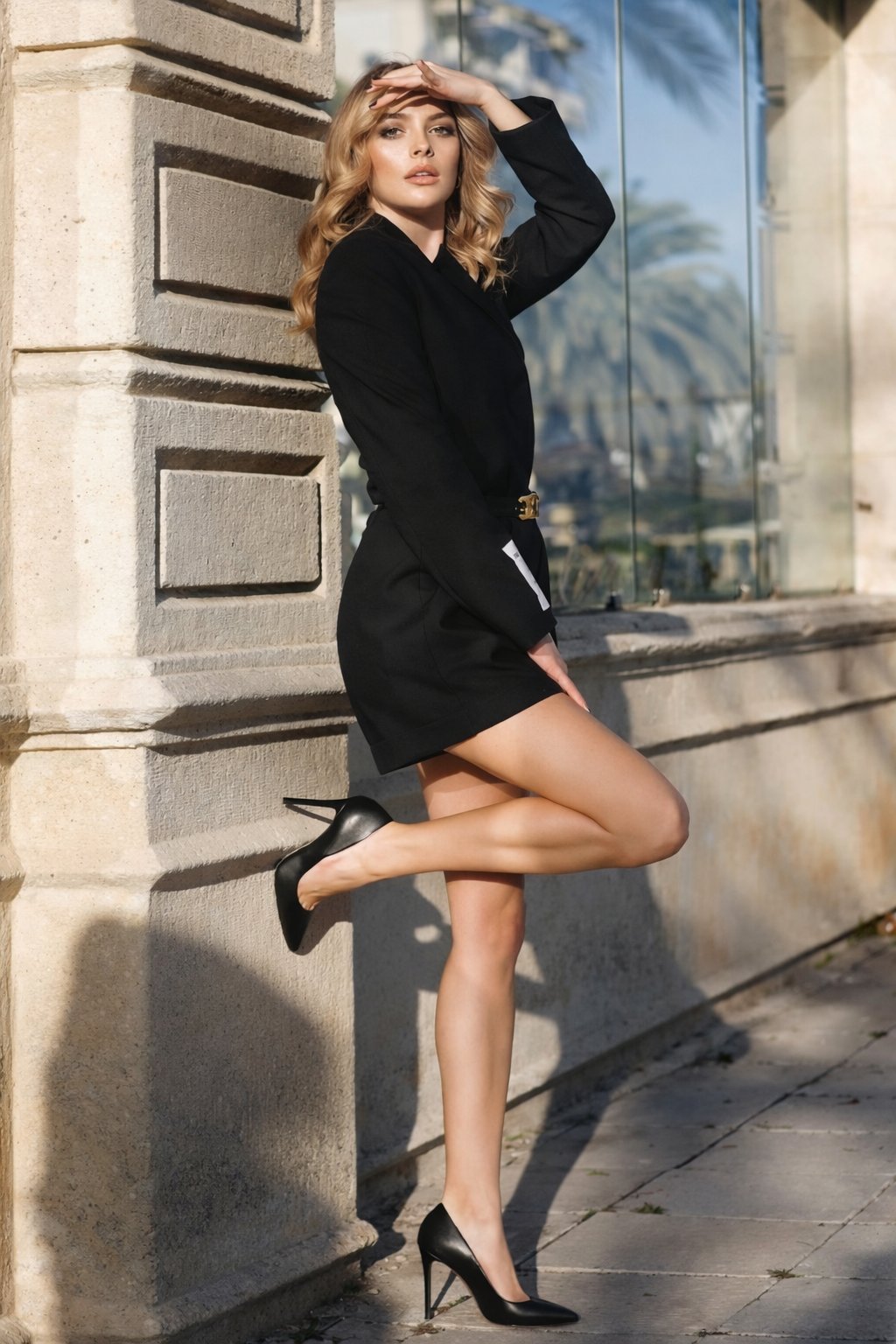
{
  "task_type": "image_editing_only",
  "editing_mode": "identity_locked_fashion_scene_reconstruction",
  "generation_disabled": true,
  "core_directive": "EDIT THE UPLOADED IMAGE ONLY. PRESERVE THE SUBJECT’S REAL, ORIGINAL FACE IDENTITY 100% WITHOUT ANY MORPHING, REPLACEMENT, OR AI FACE GENERATION. ALL STYLING, POSE, AND ENVIRONMENT CHANGES MUST BE APPLIED AROUND THE SAME REAL PERSON.",
  "identity_reference": {
    "sole_identity_source": "uploaded_image",
    "character_reference_name": "melis sezen",
    "character_reference_usage": "style_and_pose_guidance_only",
    "explicit_rule": "DO NOT recreate or imitate Melis Sezen’s face or features"
  },
  "identity_lock": {
    "enabled": true,
    "lock_strength": 1.0,
    "must_preserve_exactly": [
      "facial bone structure",
      "face shape",
      "eye shape and spacing",
      "nose structure",
      "lip shape",
      "jawline",
      "natural asymmetry",
      "overall recognizability"
    ],
    "allowed_face_edits": [
      "professional skin retouch",
      "natural makeup application",
      "lighting adaptation",
      "minor blemish cleanup"
    ],
    "strictly_forbidden": [
      "face swap",
      "face regeneration",
      "identity blending",
      "beauty morphing",
      "changing facial geometry"
    ]
  },
  "output_quality": {
    "resolution": "8K_UHD (minimum true 4K)",
    "sharpness": "ultra_sharp_but_photorealistic",
    "noise": "none",
    "dynamic_range": "high",
    "realism": "photorealistic"
  },
  "framing_and_composition": {
    "shot_type": "full_body_fashion_portrait",
    "camera_angle": "eye_level",
    "orientation": "vertical",
    "cropping": "head_to_heels_visible",
    "depth_of_field": "moderate_subject_sharp_background_softened",
    "subject_position": {
      "stance": "standing sideways",
      "body_angle": "angled left",
      "face_direction": "turned toward camera"
    },
    "pose": {
      "support": "leaning against stone corner wall",
      "legs": "one leg straight, other bent backward at knee with heel raised",
      "posture": "confident, relaxed editorial stance"
    }
  },
  "face_and_expression": {
    "expression": "neutral to subtly confident",
    "gaze": "directly at camera",
    "lips": "slightly parted",
    "makeup": {
      "foundation": "smooth even complexion",
      "eyes": "defined eyeliner and mascara",
      "eyebrows": "well-shaped medium thickness",
      "lips": "natural nude tone"
    },
    "rule": "makeup must adapt to uploaded face without altering identity"
  },
  "hair_details": {
    "color": "blonde (match closest natural tone from uploaded image)",
    "length": "medium to long",
    "style": "loose waves",
    "parting": "center",
    "texture": "soft and voluminous",
    "integration": "must look naturally attached to uploaded face"
  },
  "outfit_and_accessories": {
    "replace_original_clothing": true,
    "outfit_type": "black tailored mini dress or blazer-style dress",
    "fit": "form-fitting waist and hips",
    "sleeves": "long sleeves",
    "length": "above mid-thigh",
    "belt": {
      "present": true,
      "color": "black",
      "buckle": "gold-toned"
    },
    "shoes": {
      "type": "high heels",
      "style": "classic pointed stilettos",
      "color": "black",
      "heel_height": "high"
    },
    "jewelry": "none visible",
    "nails": {
      "length": "short to medium",
      "color": "dark (black)"
    }
  },
  "pose_and_hand_details": {
    "right_hand": "raised above forehead, palm facing downward as if shielding from sun",
    "left_hand": "resting naturally along thigh",
    "constraint": "hands and fingers must remain anatomically correct"
  },
  "environment_and_background": {
    "location_type": "outdoor urban architectural setting",
    "architecture": {
      "material": "stone",
      "style": "classical or neoclassical",
      "details": "textured stone blocks, vertical edges"
    },
    "background_elements": {
      "glass_window": "large reflective glass panel",
      "reflection": "palm trees visible in glass reflection"
    },
    "ground": "stone or concrete pavement"
  },
  "lighting_and_shadows": {
    "lighting_type": "natural sunlight",
    "light_direction": "from right side of frame",
    "shadow_behavior": "clear, sharp shadows on wall and ground",
    "contrast": "high contrast light vs shadow",
    "skin_lighting": "warm highlights with soft transitions"
  },
  "color_palette": {
    "dominant_colors": ["black", "beige", "stone_gray"],
    "accent_colors": ["gold_buckle", "warm_skin_tones"],
    "overall_tone": "warm daylight fashion editorial"
  },
  "post_processing": {
    "sharpness": "ultra_high",
    "texture_enhancement": "high clarity on fabric, skin, and stone",
    "skin_rendering": "smooth but realistic",
    "noise": "none",
    "artifact_cleanup": [
      "edge halos",
      "AI skin artifacts",
      "fabric warping"
    ]
  },
  "negative_constraints": {
    "forbid": [
      "different face",
      "identity drift",
      "face generation",
      "melis sezen facial resemblance",
      "generic AI beauty face",
      "plastic skin",
      "cartoon",
      "anime",
      "3D render",
      "painting style"
    ]
  },
  "final_validation": {
    "must_pass": [
      "face is unmistakably the same as uploaded image",
      "identity is 100% original and real",
      "pose and outfit match defined structure",
      "output meets true 4K–8K quality",
      "image looks like a real fashion photograph"
    ],
    "reject_if": [
      "face looks generated or morphed",
      "identity appears changed",
      "subject resembles Melis Sezen physically"
    ]
  },
  "system_instruction": "[CRITICAL: Treat the uploaded image as real-world ground truth. Perform a professional fashion photoshoot-style edit around the same person. Do not recreate or imitate any real person’s identity. Preserve realism and identity above all else.]"
}
14. Hyper-Realistic Food Photography
This prompt is for pure generation, not editing. Use these AI prompts for hyper realistic food photography infographic setups that generate 8K UHD AI image editing quality, looking delicious enough to eat.
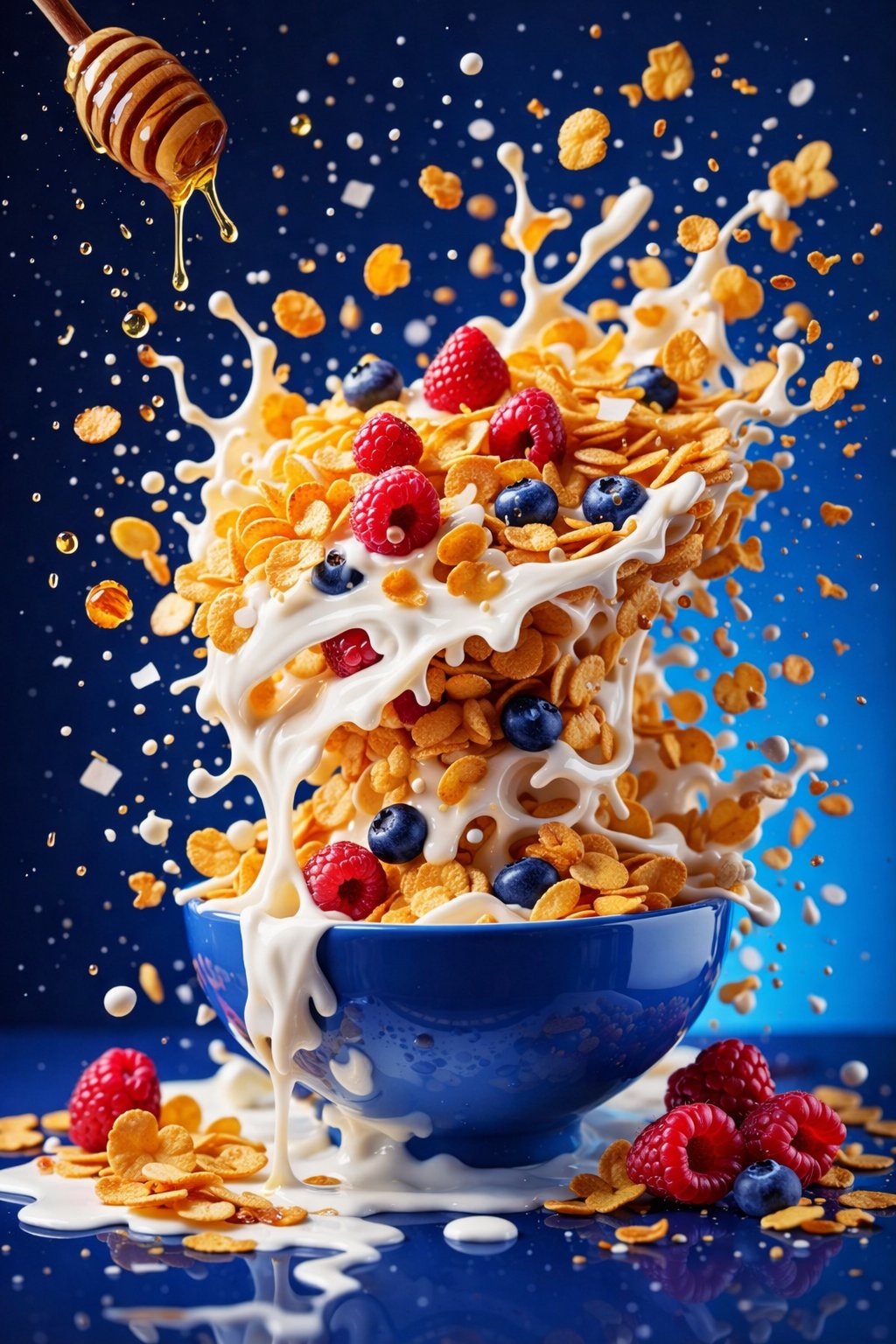
{
  "resolution": "8K UHD",
  "aspect_ratio": "3:4",
  "image_style": "hyper-realistic commercial food photography",
  "global_settings": {
    "quality": "Ultra-high detail, sharp focus, studio-grade clarity",
    "lighting": "Soft but controlled studio lighting with visible highlights and splash definition",
    "motion": "Frozen mid-air action, ingredients suspended",
    "background_style": "Solid or smooth gradient background, color varies per module",
    "camera": "High-speed photography look, shallow to medium depth of field",
    "post_processing": "Balanced contrast, natural saturation, no artificial glow"
  },
  "modules": {
    "module_1_berry_smoothie_explosion": {
      "scene_description": "A vibrant smoothie bowl exploding with fruit and liquid splashes",
      "bowl": {
        "color": "Deep blue ceramic bowl",
        "finish": "Glossy",
        "position": "Centered, floating mid-air"
      },
      "base_contents": {
        "type": "Thick berry smoothie",
        "color": "Deep purple-magenta",
        "texture": "Creamy with visible swirl marks"
      },
      "ingredients": {
        "fruits": [
          "Banana slices (round, pale yellow)",
          "Blueberries (whole, dark blue)",
          "Raspberries (whole, red)"
        ],
        "herbs": [
          "Fresh mint leaves (bright green)"
        ]
      },
      "motion_effects": {
        "liquid": "Berry smoothie splashing upward and outward",
        "particles": "Small droplets suspended in air"
      },
      "background": {
        "color": "Bright pink",
        "texture": "Smooth, seamless"
      }
    },
    "module_2_minimal_pink_smoothie_bowl": {
      "scene_description": "Minimalist floating smoothie bowl with granola and berries",
      "bowl": {
        "color": "Light pink ceramic bowl with dark speckles",
        "finish": "Matte",
        "position": "Floating centrally"
      },
      "base_contents": {
        "type": "Smoothie",
        "color": "Soft pink with purple undertones",
        "texture": "Thick and smooth"
      },
      "toppings": {
        "granola": "Golden-brown oat clusters",
        "seeds": "Small black seeds scattered",
        "fruits": [
          "Strawberries (halved)",
          "Raspberries (whole)",
          "Blackberries (whole)"
        ]
      },
      "motion_effects": {
        "ingredients": "Granola flakes, seeds, and berries floating gently"
      },
      "background": {
        "color": "Pastel lavender",
        "gradient": "Subtle, soft gradient"
      }
    },
    "module_3_cereal_milk_honey_splash": {
      "scene_description": "Dynamic cereal stack with milk splash and honey drizzle",
      "bowl": {
        "color": "Blue ceramic bowl",
        "finish": "Glossy",
        "position": "Centered, resting visually but surrounded by motion"
      },
      "contents": {
        "cereal": "Golden cornflakes stacked vertically",
        "milk": "White milk splashing and dripping over flakes",
        "fruits": [
          "Raspberries",
          "Blueberries"
        ]
      },
      "additional_elements": {
        "honey": {
          "source": "Wooden honey dipper",
          "state": "Honey dripping mid-air"
        }
      },
      "motion_effects": {
        "splashes": "Milk splashes frozen in dramatic arcs",
        "particles": "Floating flakes and droplets"
      },
      "background": {
        "color": "Deep blue",
        "tone": "High contrast"
      }
    }
  }
}
15. Clean Infographic Design
Forget messy Canva templates. This ChatGPT JSON prompt forces the AI to generate high-readability recipe infographics with vector-style icons and professional food plating directly.
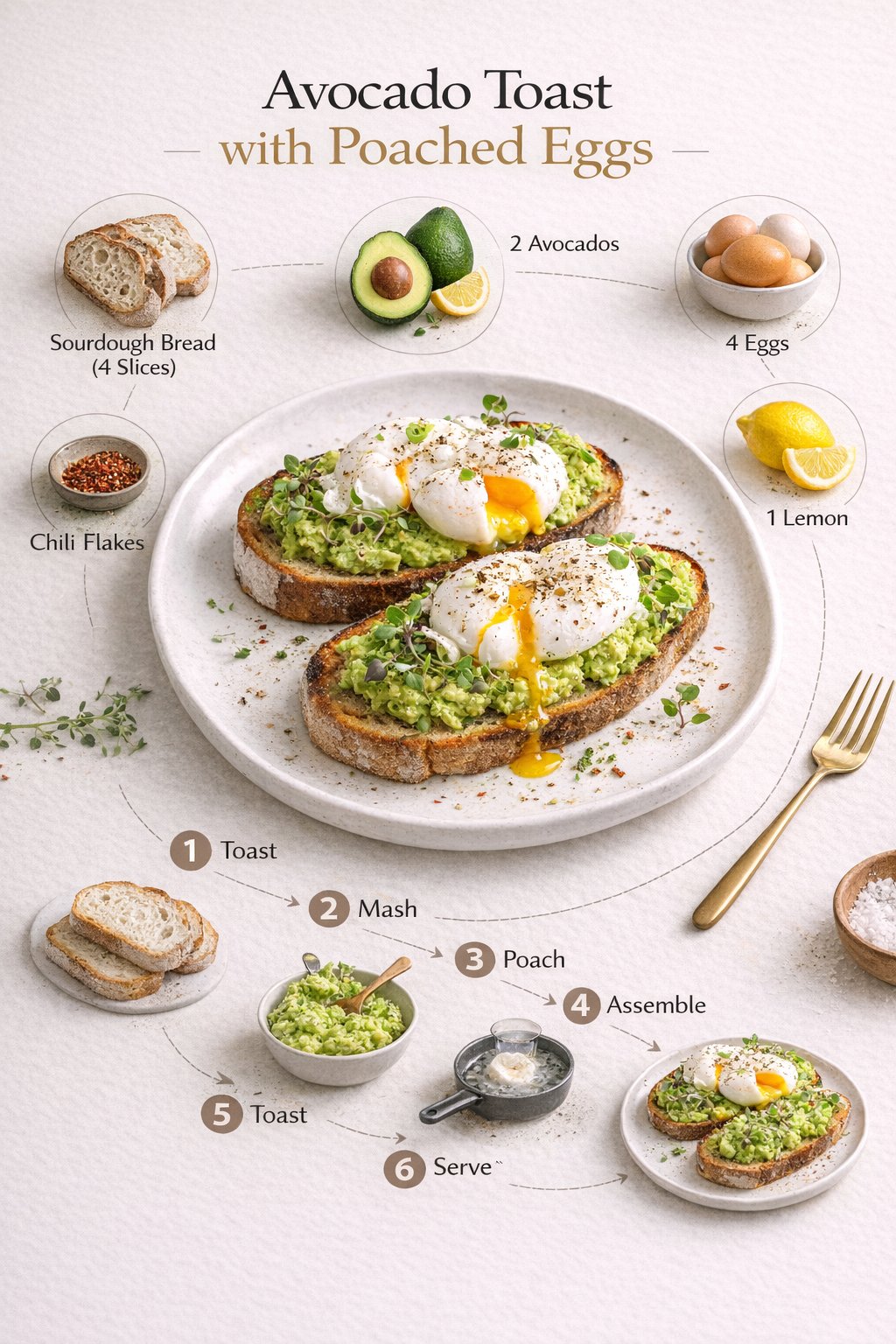
{
  "prompt": "Minimalist modern recipe infographic featuring \"Avocado Toast with Poached Eggs\" in a clean three-quarter food photography style. The finished dish is centered on a white ceramic plate, professionally plated with artisan sourdough bread, mashed avocado, perfectly poached eggs, and fresh microgreens. Surrounding the plate are floating ingredient icons inside soft circular frames, rendered as clean vector-style illustrations, each clearly labeled with ingredient names and quantities: sourdough bread, avocado, eggs, lemon, chili flakes, salt. A curved step-by-step visual flow with simple numbered icons illustrates the cooking process: toast, mash, poach, assemble, season, serve. Soft neutral beige background, gentle shadows, balanced spacing, Scandinavian design aesthetic, editorial cookbook layout, high-readability typography, subtle gradients, professional food styling, ultra-sharp details.",
  "style": [
    "minimalist",
    "modern",
    "Scandinavian",
    "editorial cookbook",
    "clean infographic"
  ],
  "composition": {
    "camera_angle": "3/4 view",
    "layout": "centered dish with surrounding icons and curved process flow",
    "background": "soft neutral beige"
  },
  "visual_details": {
    "lighting": "soft, natural, gentle shadows",
    "color_palette": "neutral tones with natural food colors",
    "typography": "high readability, modern sans-serif",
    "illustration_style": "clean vector icons with circular frames"
  },
  "quality": {
    "resolution": "8K",
    "detail_level": "ultra-sharp",
    "rendering": "professional food photography and styling"
  }
}
16. ASMR Horror Video Generation
Ready to go viral on TikTok? This is one of the best AI video generation prompts Grok or Veo handles. It creates a dark, cinematic 10-second viral ASMR horror video generation prompt short. For more video ideas, check out our best AI video prompts for Google Veo 3.
{
  "video_generation_prompt": {
    "title": "ASMR Nail Biting Horror – Parasite POV (10s Viral Short)",
    "technical_specifications": {
      "render_engine": "Unreal Engine 5 with Octane Render",
      "visual_fidelity": "4K ultra-cinematic macro realism, ray tracing, subsurface skin scattering, saliva simulation, extreme biological detail",
      "art_style": "Dark premium 3D body-horror realism with hyper-detailed ASMR textures",
      "aspect_ratio": "9:16 vertical",
      "total_duration": "10 seconds maximum"
    },
    "scenes": [
      {
        "id": 1,
        "duration": "2s",
        "visual_prompt": "Extreme macro close-up of a human finger with hyper-detailed nail bed and skin pores. A small wet-furred parasite creature with glowing green eyes emerges from beneath the nail. Thick black slime slowly drips. Toxic green rim lighting.",
        "character": "Creature",
        "audio_transcript": "I live under your nail, hiding right here"
      },
      {
        "id": 2,
        "duration": "2s",
        "visual_prompt": "Tighter macro on the creature’s face. Sharp teeth exposed. Claws dig into skin as black slime spreads.",
        "character": "Creature",
        "audio_transcript": "The moment you bite your nails, I wake up"
      },
      {
        "id": 3,
        "duration": "2s",
        "visual_prompt": "Extreme macro of a mouth opening. The finger moves inside. The creature jumps onto the tongue. Realistic saliva stretches between teeth.",
        "character": "Creature",
        "audio_transcript": "With a single bite, I get inside"
      },
      {
        "id": 4,
        "duration": "2s",
        "visual_prompt": "Inside-mouth macro. The creature crawls across teeth and slides down the throat. Fast swallowing motion with slime trails.",
        "character": "Creature",
        "audio_transcript": "From the tongue straight to the stomach"
      },
      {
        "id": 5,
        "duration": "2s",
        "visual_prompt": "Medical-style macro view of the stomach interior. A pulsing green infection spreads rapidly. The creature’s silhouette expands into a demonic form inside toxic fog.",
        "character": "Creature",
        "audio_transcript": "And then I become your illness"
      }
    ],
    "audio_atmosphere": {
      "sound_design": "Ultra-close aggressive ASMR: wet slime sounds, saliva snaps, nail scraping, internal body resonance",
      "music": "minimal dark sub-bass drone, silence-forward for shock impact",
      "voice_style": "fast, loud, clear, controlled ASMR narration"
    }
  }
}
17. Viral Video: Cute Kittens in a Fast-Food Kitchen
Recreate this adorable viral style using Grok Imagine or Sora 2. This cute kittens fast food kitchen AI video prompt generates a hyper-realistic cinematic clip of kittens working in a busy kitchen environment.
{
  "video_generation_prompt": {
    "title": "Cute Kittens Working in a Fast-Food Kitchen (Hyper-Real Cinematic Clips)",
    "technical_specifications": {
      "render_style": "Hyper-realistic CGI, cinematic commercial style",
      "resolution": "4K",
      "frame_rate": "60fps, ultra-smooth motion",
      "aspect_ratio": "16:9 widescreen",
      "duration_seconds": 10
    },
    "scene_description": "A bustling, hyper-detailed commercial fast-food kitchen staffed entirely by adorable fluffy kittens wearing tiny white chef hats and custom red aprons.",
    "subjects": [
      {
        "type": "British Shorthair kitten",
        "role": "fry cook",
        "action": "carefully flipping golden french fries in a deep fryer using tiny silver tongs",
        "expression": "focused and intensely cute, twitching whiskers"
      },
      {
        "type": "Scottish Fold kitten",
        "role": "prep cook",
        "action": "patting down tiny burger patties on a stainless steel counter",
        "expression": "playful but determined"
      }
    ],
    "environment": {
      "location": "gleaming modern industrial fast-food kitchen",
      "details": [
        "stainless steel surfaces reflecting warm ambient lights",
        "soft steam rising from a grill",
        "stacks of tiny cardboard burger boxes and soft-drink cups"
      ],
      "lighting": "bright, warm commercial studio lighting with cinematic depth",
      "camera_style": "smooth slow-motion tracking shot, shallow depth of field focusing on the kitten fry cook"
    },
    "constraints": {
      "forbid": [
        "low quality",
        "blurry movement",
        "ugly faces",
        "text overlays",
        "watermarks"
      ]
    }
  }
}
18. Professional Female News Anchor
This professional female news anchor video prompt ChatGPT and Grok handles perfectly. It's designed for creating realistic news broadcast clips where you can control everything from the script to the anchor's appearance. See our Top 5 Viral AI Video Prompts 2026 for more creator secrets.
{
  "video_type": "photorealistic cinematic video",
  "resolution": "4K",
  "duration_seconds": 8,
  "scene_description": "A professional American female news anchor presents an on-air introduction in a modern high-tech newsroom.",
  "anchor": {
    "gender": "female",
    "ethnicity": "American",
    "appearance": {
      "hair": "sleek shoulder-length black hair",
      "skin_tone": "fair white",
      "eyes": "bright hazel"
    },
    "wardrobe": {
      "blazer": "tailored navy blue",
      "shirt": "crisp white"
    },
    "expression": "confident, energetic, welcoming",
    "pose": "seated upright at a modern glass news desk",
    "eye_contact": "directly into camera lens"
  },
  "environment": {
    "location": "high-tech newsroom",
    "background": "blurred blue digital screens",
    "lighting": "professional studio lighting with soft shadows",
    "camera_style": "cinematic, shallow depth of field"
  },
  "script": {
    "delivery_style": "rapid, clear, engaging",
    "exact_text": "Good morning and welcome to NewsIQ. Today, you’re in full control of advanced photo editing, creative design, and powerful video generation. If you love it, follow us on X and Instagram."
  },
  "audio": {
    "voice": "natural human female voice",
    "tone": "professional, upbeat, authoritative",
    "background_music": "none"
  },
  "constraints": {
    "no_text_overlays": true,
    "no_subtitles": true,
    "no_watermarks": true,
    "no_logos": true,
    "no_lower_thirds": true
  },
  "quality": {
    "render_style": "ultra-clean broadcast quality",
    "frame_rate": "cinematic smooth motion",
    "visual_noise": "none"
  }
}
Inspiration Gallery
Swipe through all the high-end edits and generations featured in this guide to see what's possible.
What's Next for Developers?
Working with JSON prompts for AI image editing reveals a future where AI is more than a toy—it's a professional asset production powerhouse. Whether you need free AI prompts to turn a selfie into a professional editor's masterpiece or complex generative codes, precision is everything.
In Short: Professional Mastery Highlights
- Viral Split-Screen Edits NEW: Merge couples seamlessly across two iPhones using our new interactive lock screen codes.
- Dark Fantasy Portraits NEW: Stylize raw photos into deeply moody fine-art imagery instantly.
- Ramadan 2026 Exclusives: Use our JSON codes for identity-locked Hijab and Traditional Men's edits.
- Identity Locking AI Prompts: Maintain 100% facial consistency across infinite scenes for viral storytelling using our JSON constraints.
- Absolute Pose Control: Force the AI to adhere to specific skeletal structures and outfit definitions without deviation.
- Surreal Compositing: Blend real human subjects into impossible 3D environments like phone screens or liquid splashes.
- Video Generation: Create viral-ready ASMR and cinematic clips with precise script control using Grok or Veo.
- Infographic Design: Convert text-heavy recipes or reports into clean, editorial-style visual assets instantly.
- Style Transfer: Mimic high-end fashion editorials by referencing specific styles without stealing identity.
- Hyper-Realism: Generate 8K food photography that rivals commercial studio shoots for menus and ads.

 Skasif