OpenAI Rolls Out GPT Image 1.5 for Faster AI Image Creation
 Skasif
17/12/2025
Skasif
17/12/2025 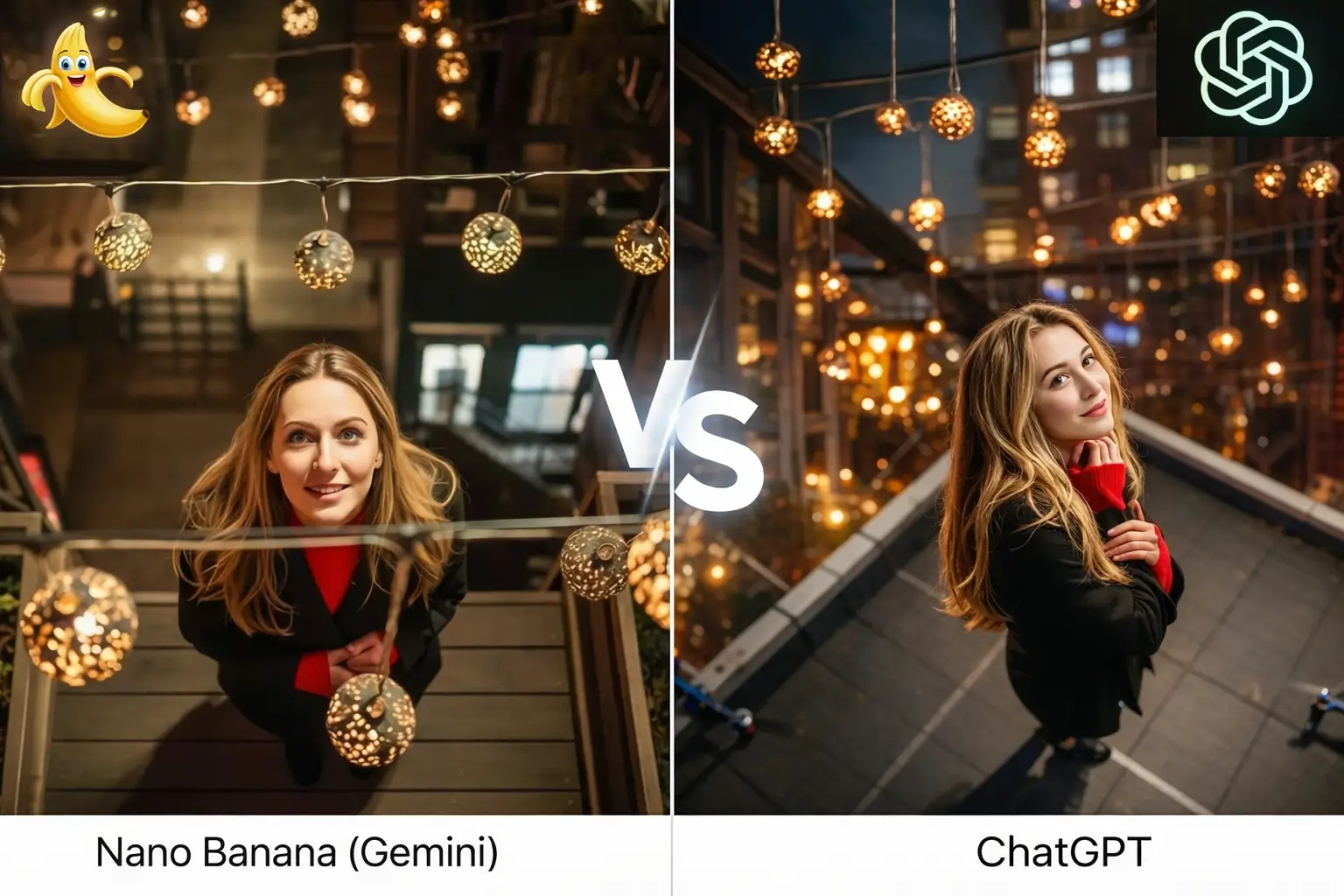
Side by side comparison showing an image generated with Google Nano Banana Pro 3 on the left and OpenAI ChatGPT GPT Image 1.5 on the right.
OpenAI launched GPT Image 1.5 on December 16, 2025, bringing a fresh wave of improvements to how people create and tweak images right inside ChatGPT. This update focuses on making the process faster, more accurate, and reliable, so whether you’re brainstorming ideas, designing marketing materials, or just experimenting for fun, you get results that feel closer to what you imagined.
It’s part of the ongoing push in AI to turn image tools from playful experiments into something truly useful for real tasks, like building consistent brand visuals or quickly prototyping product ideas.
What’s Improved in GPT Image 1.5?
The new model tackles some of the biggest hurdles in AI image creation, helping users iterate quickly without frustration.
Blazing-Fast Generation Speed
One of the biggest changes is speed—images can now pop up up to four times faster than before. This means you can try out multiple versions in seconds, even generating several options at the same time. No more long waits that break your creative flow.
Sharper Understanding of Prompts
GPT Image 1.5 is much better at grasping detailed instructions. Whether you’re describing a complex scene with specific object placements, grids, or step-by-step builds, it follows along more reliably, delivering outputs that align with your vision.
Precise Editing with Strong Consistency
Editing stands out here: you can make targeted tweaks—like cooling down the lighting, adding or removing items, or shifting a person’s expression—while the tool keeps everything else steady. Faces stay recognizable, colors and logos don’t shift unexpectedly, and the overall composition holds together. This avoids the common issue where a small change triggers a complete redo of the image.
Improved Handling of Text
Rendering words in images has gotten a solid boost. It manages small details, crowded layouts, or text in various languages more accurately, making it handy for things like custom posters, detailed infographics, or branded mockups where clear text matters.
Natural-Looking Photo Edits
Upload your own photos and describe changes in everyday language—for example, trying on different outfits, swapping backgrounds, blending artistic styles, or updating hairstyles. The results feel realistic and stay true to the original photo’s vibe.
All these tweaks add up to a tool that’s great for maintaining brand consistency across visuals, speeding up ecommerce product shots, or supporting any workflow that needs quick, high-quality images.
New ChatGPT Images Experience
OpenAI didn’t stop at the model—they gave the whole interface a thoughtful redesign to feel more like a dedicated workspace.
You’ll find a new Images sidebar in ChatGPT (available on web, iOS, and Android), packed with preset styles, handy filters, and trending prompt suggestions to get your ideas flowing. The layout makes it straightforward to browse examples, start new generations, view your creations, and refine them step by step. Uploading photos for edits is seamless too.
As Fidji Simo, OpenAI’s head of applications, put it, this turns ChatGPT into “your personal creative studio” designed around working with visuals.
Availability and Developer Access
Everything rolled out immediately on December 16, 2025, and it’s available to every ChatGPT user, even on the free plan no extra steps or model switches needed.
For developers, GPT Image 1.5 is accessible via the OpenAI API, with lowered pricing (around 20% cheaper in some cases) to make it easier to integrate into apps and services.
How It Stacks Up Against Google’s Nano Banana Pro
This launch was sped up in response to strong competition, particularly from Google’s Nano Banana Pro (powered by Gemini 3 Pro), which gained a lot of attention for its realistic outputs and advanced features.
Here’s a comparison based on capabilities:
| Feature | GPT Image 1.5 (OpenAI) | Nano Banana Pro (Google) |
|---|---|---|
| Generation Speed | Up to 4x faster than previous OpenAI model | Fast, with support for concurrent processing |
| Prompt Adherence | Excellent for complex layouts and multi-step instructions | Strong, especially with real-world knowledge integration |
| Editing Precision | Targeted changes preserve faces, logos, composition | Advanced localized edits, style blending, and multi-image fusion |
| Text Rendering | Superior for small, dense, or multilingual text | Excellent for legible text in infographics and diagrams |
| Photo Transformations | Realistic clothing swaps, object add/remove, hairstyles | High-quality up to 4K, with camera/lighting controls |
| Resolution | High-quality standard outputs | Up to 4K resolution available |
| Consistency | Strong preservation across iterative edits | Great character and brand consistency |
| Availability | Free for all ChatGPT users; cheaper API | Higher limits for paid Gemini subscribers |
| Unique Strengths | Seamless integration in ChatGPT; rapid iterations | Viral realism; web-grounded details; SynthID watermarking |
Both are top-tier tools pushing AI images toward professional use, with OpenAI emphasizing speed and editing control, while Nano Banana Pro shines in hyper-realistic details and higher resolutions.
Tips for Getting Started
Getting started is easy. Open ChatGPT, switch to the Images tab, and choose a preset or describe what you want to create in your own words. If you already have an image, you can upload it to refine details, adjust styles, or make precise edits without starting from scratch.
For stronger results, focus on clear and specific prompts. Mention key details like mood, lighting, subject focus, or style so the system understands exactly what you want. When editing, make changes step by step instead of all at once. This helps maintain visual consistency and avoids unwanted shifts in quality or composition.
As AI image technology continues to evolve, GPT Image 1.5 makes visual creation more approachable and efficient. It works just as well for casual experimentation as it does for serious content creation, helping individuals and teams move faster from idea to finished image. The result is a creative process that feels more natural, more reliable, and genuinely useful in everyday work.
Your point of view caught my eye and was very interesting. Thanks. I have a question for you.