Gmail Gets Smarter: Google’s Gemini AI Transforms Email into a Personal Assistant
 Skasif
08/01/2026
Skasif
08/01/2026 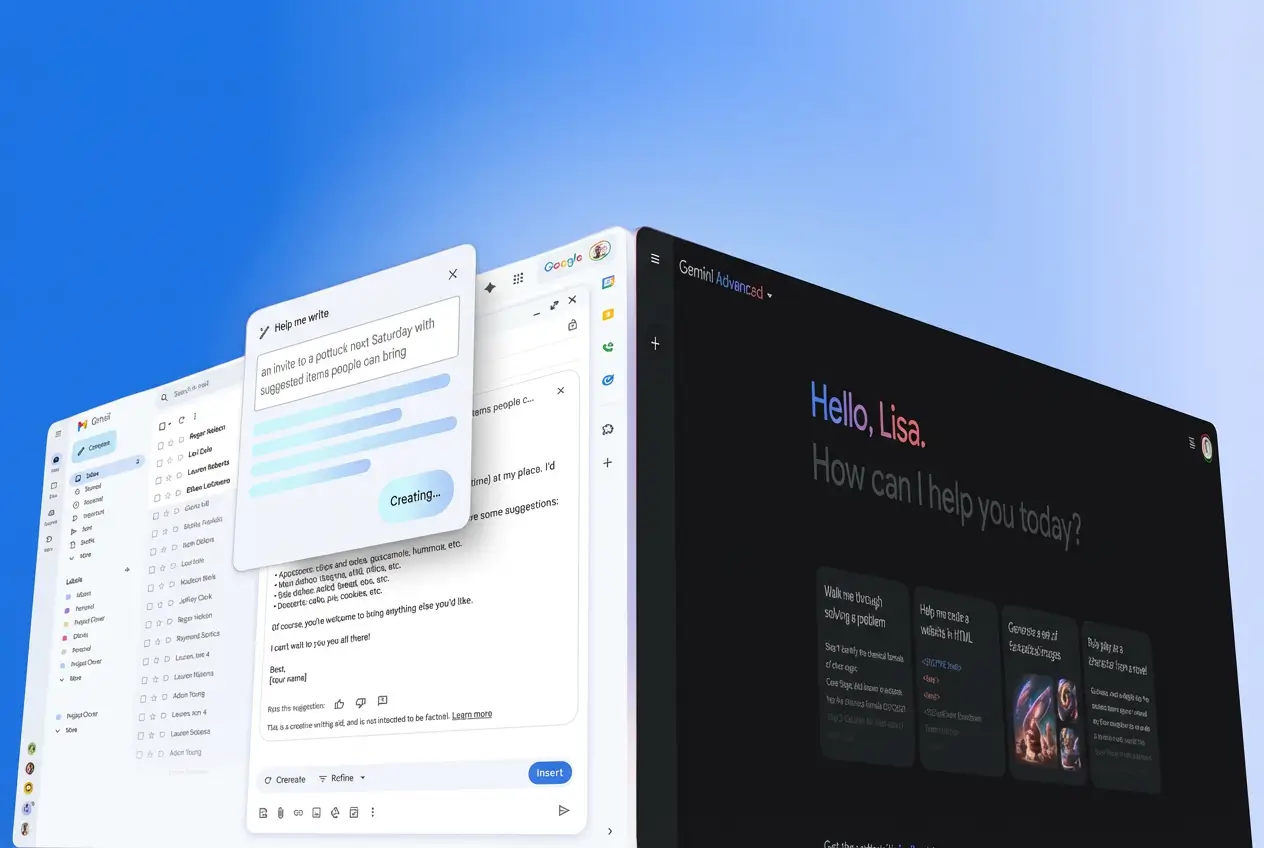
Gmail Gets Gemini AI in 2026 With Summaries, Writing Help, and More
Google Brings Gemini AI to the Inbox
Google has announced a major update to Gmail that marks a significant shift in how email is used. Revealed on January 8, 2026, the update is powered by Gemini 3 and goes beyond routine feature additions. Instead of functioning only as an email platform, Gmail is now positioned as an intelligent assistant designed to help users manage their inbox more efficiently. With more than three billion people worldwide relying on Gmail, the change could have a wide impact on daily communication and productivity.
Google describes this update as the start of the Gemini era for Gmail, where the service actively supports users rather than simply storing messages. New capabilities include summarizing long email threads and drafting replies that match a user’s writing style. These features are aimed at reducing the time spent on email management and helping users focus on more important tasks. This report examines what the update includes, how it works, and why it matters for Gmail users.
The rollout begins today in the United States for English language users, with support for additional languages and regions expected in the coming months. Many of the new features are available at no cost to all Gmail users, while advanced tools are reserved for Google AI Pro and Ultra subscribers. Google says privacy remains a priority, with secure on device and cloud based processing, along with clear controls that allow users to disable the features at any time.
New Features
Google has introduced a set of connected tools powered by the reasoning capabilities of Gemini 3. Together, they are designed to reduce inbox overload and improve how users access information.
One of the first features users will notice is AI Overviews. This tool brings the familiar summary experience from Google Search directly into Gmail. When a user opens a long email thread, Gmail automatically displays a short summary at the top, highlighting important points, decisions, and next steps. This allows users to understand the conversation quickly without scrolling through every reply.
For paid subscribers, AI Overviews extends beyond summaries. Users can search their inbox using natural language questions, such as asking for a past service quote or details from a previous online order. Gemini analyzes relevant emails and, in some cases, attachments to deliver a direct answer, along with references to the original messages.
This feature addresses one of the most common frustrations with email, locating important information buried deep in the inbox. Early coverage from technology outlets notes that it simplifies complex searches and turns everyday questions into clear and immediate answers.
Email writing also becomes more accessible with expanded access to Help Me Write and the introduction of enhanced Suggested Replies. Previously available only to subscribers, Help Me Write is now free for all Gmail users. The feature allows users to generate complete email drafts from a short prompt or refine existing messages. By describing the situation, such as responding politely to an invitation while proposing a new date, Gemini produces a clear and natural response.
Suggested Replies builds on the earlier Smart Replies feature but adds a stronger layer of personalization. The system studies a user’s writing habits, tone, and commonly used phrases to generate one tap responses that sound like the user. Whether emails are typically brief and formal or friendly and detailed, the suggestions adjust to match that style. Technology publications have described this as a meaningful improvement, especially for users who rely on quick replies on mobile devices or manage large volumes of email.
For users who want more refined communication, Google has introduced an advanced Proofread tool. Available to Google AI Pro and Ultra subscribers, it goes beyond basic spelling and grammar checks. The feature reviews tone, clarity, and structure, then suggests improvements that can be applied instantly. It is designed to help users send more polished messages with minimal effort.
The Standout Addition AI Inbox
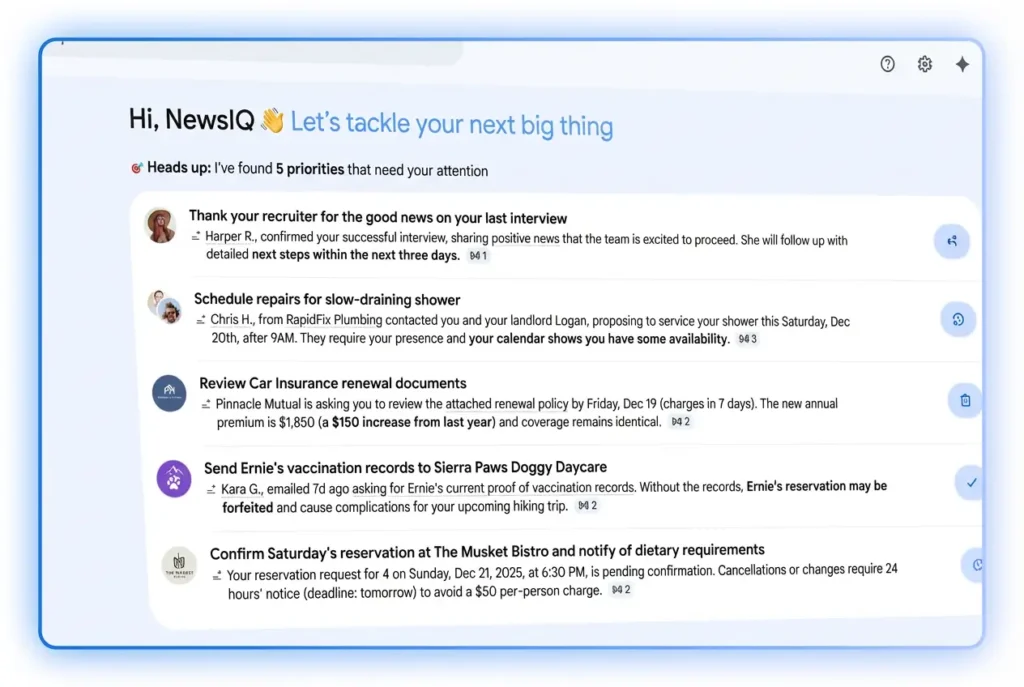
The most ambitious part of the update is AI Inbox, a redesigned view that changes how emails are presented. Rather than showing messages only in chronological order, the inbox offers a personalized overview of what matters most.
At the top, users see suggested actions pulled from urgent emails, such as upcoming bills or time sensitive appointments. Below that, related conversations are grouped together with short summaries and direct links to key threads. Gemini determines priorities based on user behavior, including frequent contacts, response patterns, and inferred relationships.
AI Inbox is launching first to a limited group of trusted testers, with broader availability expected in the coming months. Early reports describe it as a cleaner and more focused dashboard that reduces noise and brings important information to the forefront.
Today we’re bringing @Gmail into the Gemini era, making it a personal, proactive inbox assistant to help you manage your life, not just your messages. Explore the new features launching today, many of which are made possible by Gemini 3 🧵⬇️ pic.twitter.com/30ABrZBInv
— Google (@Google) January 8, 2026
| Feature | Description | Availability | Free or Subscription Required |
|---|---|---|---|
| AI Overviews Thread Summaries | Automatically highlights key points from long email conversations | Rolling out today | Free for all users |
| AI Overviews Natural Language Search | Allows users to ask questions across their entire inbox | Rolling out today | Google AI Pro or Ultra |
| Help Me Write | Drafts or refines emails using short prompts | Rolling out today | Free for all users |
| Suggested Replies | Personalized one click replies based on writing style and context | Rolling out today | Free for all users |
| Proofread | Advanced checks for grammar tone clarity and style | Rolling out today | Google AI Pro or Ultra |
| AI Inbox | Proactive inbox view with suggested tasks and topic summaries | Trusted testers now wider rollout coming | All users phased |
Accessing these tools is straightforward. On the web or app, look for the sparkling pen icon when composing, or summary cards in threads. For searches, use the main search bar with natural questions if you’re subscribed.Google emphasizes control. You can disable any AI feature in settings without losing core functions like spam protection. Data processing stays private, with no use for training broader models.If you’re on mobile, updates appear gradually on Android and iOS. For the best experience, ensure your app is current.
Ready to try them? Here’s a practical guide.
- For Thread Summaries and Suggested Replies (free, immediate):
- Open Gmail on web or app.
- Navigate to an existing thread or start a reply.
- Look for the automatic summary card or reply suggestions at the bottom.
- Tap to insert or expand as needed.
- Using Help Me Write:
- Start a new email or reply.
- Click or tap the Help Me Write button (pen with sparkle).
- Enter a prompt describing what you need.
- Review, edit, and send the generated text.
- Natural Language Search (subscription required):
- Go to the Gmail search bar.
- Type your question in plain English.
- View the AI Overview response with sourced details.
- Accessing AI Inbox (when available):
- Check the side panel for the AI Inbox tab.
- Switch views to see your personalized briefing.
- Click items to jump to full emails.
Google enters the Gemini era
— Veo Prompt (@VeoPrompt) January 8, 2026
Free for all users:
• AI thread summaries
• Help Me Write email drafts
• Personalized suggested replies
Pro and Ultra users:
• Natural language inbox search
• Advanced proofread tools
Coming soon: AI Inbox with smart to dos and priority views. pic.twitter.com/Q8rTRIu3mE
What This Means for the Future of Email
This update stands out because it directly addresses long standing frustrations with email. Message volume has grown rapidly, turning inboxes into constant task lists. By making Gmail more proactive, Google is positioning it as more than a storage tool. It becomes an intelligent assistant designed to reduce effort and improve focus.
Rival platforms, including Microsoft with Copilot, are moving in a similar direction. However, Google’s scale and deep integration of Gemini 3 give Gmail a strong advantage in reasoning and personalization. Industry analysts note that this shift could significantly improve productivity, particularly for users who manage large volumes of email every day.
Privacy remains an important consideration. Google says many processes run securely and provides clear controls that allow users to manage or disable AI features. As the rollout expands, further refinements are expected based on user feedback.
For users overwhelmed by email, this update may offer a meaningful reset. Many of the features are already live, with broader access continuing over time. Business users can also expect similar capabilities through Workspace, though the initial rollout focuses on personal accounts. Together, these changes mark a step toward making email more efficient, more helpful, and better suited to modern communication needs.
Conclusion
Google’s Gemini powered upgrade signals a broader shift in how email is expected to function. Gmail is no longer positioned as a passive inbox but as an active system that helps users prioritize, respond, and retrieve information with less effort. By embedding advanced AI directly into everyday email tasks, Google is setting a new benchmark for digital communication tools.
While the long term impact will depend on adoption, accuracy, and user trust, the direction is clear. Email is becoming more intelligent, more personalized, and more responsive to real world needs. As additional features roll out and refinements are made, Gmail’s evolution may influence how the entire industry approaches productivity and personal communication.
For now, this update represents one of the most significant changes to email in years. If Google delivers on its promises, Gemini could redefine how users manage information, saving time and restoring focus in an increasingly crowded digital world.